
Anker Vertical Ergonomic Mouse Review 2026: Which Model Actually Fits Your Hand?
If your wrist feels stiff or achy by mid-afternoon, a vertical mouse is usually one of the first things I recommend people try before spending money on anything more expensive. Anker makes three different vertical mice, and the specs alone don’t tell you which one is right for your setup. I’ve pulled apart the wired, wireless, and renewed Anker models here, and lined them up against four other well-reviewed vertical mice, TECKNET, Seenda, Lekvey, and AOC, so you can see where Anker genuinely competes and where a different brand makes more sense.
Quick Answer
For most office and remote workers, the Anker 2.4G Wireless Ergonomic Mouse (AK-98ANWVM-UBA) is the best overall pick among this group, it has the largest review base by far (over 53,000 ratings), a reliable 2.4G USB receiver connection, and a price that sits comfortably in the budget-to-mid-range bracket. If you want to spend less, the Anker USB Wired Vertical Mouse covers the same ergonomic shape for under $20. If you have smaller hands or want extra features like RGB and multi-device Bluetooth, the AOC and TECKNET models are worth a look instead.🖱️Best Vertical Ergonomic Mice 2026
Seven models compared, each picked for a different reason. Tap any card to check the current Amazon price.


Quick Verdict Table
| Product | Best For | Main Strength | Main Limitation | Rating | Link |
|---|---|---|---|---|---|
| Anker 2.4G Wireless (AK-98ANWVM-UBA) | Everyday office use | Most-reviewed model here (53,468 ratings) | Runs on 2 AAA batteries, not included | 4.2/5 | Check Price |
| Anker USB Wired | Tight budgets | Lowest price, no battery dependency | Cable limits desk placement | 4.4/5 | Check Price |
| Anker Wireless (Renewed) | Wireless on a wired budget | Cheapest wireless Anker option | Renewed condition, 90-day warranty | 4.2/5 | Check Price |
| TECKNET Ergonomic Mouse | Switching between devices | Bluetooth 5.0/3.0 + USB receiver, rechargeable | Forward/back buttons don’t work on Mac | 4.6/5 | Check Price |
| seenda MOU-302 | Quiet offices, video calls | Silent clicks + built-in volume knob | Heaviest mouse in this group (6.4 oz) | 4.6/5 | Check Price |
| Lekvey Ergonomic Mouse | Infrequent charging | Claimed ~150 hours per charge | Sized for medium/large hands only | 4.3/5 | Check Price |
| AOC Ergonomic Mouse | Small-to-medium hands | Triple connectivity, programmable buttons, LED battery display | Only 232 reviews so far; limited long-term feedback | 4.4/5 | Check Price |
Why Trust This Review
I’m Emily Richardson, an ergonomics and work-from-home product specialist with 9+ years of experience researching office equipment, computer accessories, and home-office setups for ErgoFixes. This review is based on the manufacturers’ published specifications, current Amazon listings, and general ergonomics research, not on a claim that our team has physically tested every model here. Where I mention hands-on impressions, I’ve said so; everywhere else, this is design-based and specification-based analysis, and I’ve flagged the spots where Amazon’s own listing data is inconsistent.
Is a Vertical Mouse Actually Worth It?
Short answer: for most people who spend several hours a day on a computer, a vertical mouse is a low-cost, low-risk change worth trying, but it isn’t a guaranteed fix for existing wrist pain.
A standard flat mouse requires the forearm to rotate palm-down, a position called pronation. OSHA’s computer workstation guidance recommends keeping the hands, wrists, and forearms straight, in-line, and roughly parallel to the floor to reduce strain during computer work (OSHA Computer Workstations eTool). A vertical mouse angles the hand into more of a handshake position, which several ergonomics studies link to reduced forearm muscle activity compared with a flat mouse.
Research Insight: A CDC-published study comparing several mouse concepts found that increasing mouse height and angling the mouse body reduced forearm pronation without hurting pointing accuracy, but it also found the fully vertical design had the weakest pointing performance of the group tested, while a moderately angled design performed better on both comfort and accuracy (CDC/NIOSH mouse design study).
What this means: the general mechanism, less forearm pronation, potentially less strain, is reasonably well supported. What isn’t proven is that any single product on this page will resolve pain you’re already experiencing. Vertical mice also take some adjustment time, and a small number of users find a fully vertical grip less precise for detailed work like photo editing.
Other anatomical research adds a further wrinkle. A biomechanical analysis from Hasselt University found that a fully vertical “handshake” grip can stretch the interosseous membrane connecting the forearm bones to its most taut point, and suggested a lightly slanted grip (roughly 25–30°) may require less muscle effort than a fully vertical one. This is a useful reminder that “vertical” isn’t automatically “optimal”, it’s also why none of the seven mice in this review sit at a full 90°; most use a 45–57° grip, closer to the moderately angled designs this research favors.
It’s also worth noting that the research isn’t unanimous on a fully vertical “handshake” position being the ideal angle for everyone. Some anatomical research has raised questions about whether a fully upright grip increases tension across a connective structure in the forearm called the interosseous membrane, and suggests a moderately slanted grip (roughly 25–30°) may relax that tissue more than a full 90° vertical shape. In practical terms, this means a moderately angled mouse isn’t automatically inferior to a fully vertical one, the two products in this comparison with a stated 52° angle (the TECKNET and AOC) sit closer to the range several studies associate with lower forearm muscle activity than a fully vertical grip.
Repetitive strain from awkward wrist postures is a recognized occupational health concern, not a fringe claim, the CDC’s National Institute for Occupational Safety and Health ergonomics program studies musculoskeletal disorders linked to repetitive motion and awkward posture across a range of jobs, computer work included. That’s a reason to take wrist comfort seriously at a desk job, not a claim that any specific mouse on this page prevents or treats a disorder.
If you’re dealing with ongoing wrist, hand, or forearm pain rather than general end-of-day fatigue, that’s worth discussing with a doctor or physical therapist rather than solving through a product purchase alone.
Buying Guide: What Actually Matters in a Vertical Mouse
Before comparing individual products, it helps to know which specifications genuinely affect day-to-day comfort, and why mouse shape matters at all for people who spend hours at a desk. Research published in the Journal of Health Science and Surveillance System identifies prolonged mouse use on a flat, non-slanted surface as a contributing factor to sustained forearm and wrist muscle load, particularly for people using a computer more than six hours a day. In practical terms, this doesn’t mean a flat mouse is unsafe, it means the shape and angle of whatever mouse you use is a genuinely relevant variable, not a cosmetic detail, if you’re at a keyboard most of the day.
Hand size and grip fit. Vertical mice are not one-size-fits-all. A shell built for small-to-medium hands (like the AOC or seenda) can feel cramped for someone with large hands, while a mouse sized for medium/large hands (like the Lekvey) can feel bulky and hard to control for someone with small hands.
Vertical angle. Most consumer vertical mice sit somewhere between 45° and 57°. This range matters more than it might seem: research published in the Journal of Health Science Surveillance System found that forearm pronation beyond roughly 60° from vertical produces a marked increase in forearm muscle activity, while a moderately angled grip (around 25–30°) reduced activity in the muscles most associated with mouse-related strain. In practice, this means a steeper angle isn’t automatically better, the goal is a grip that avoids full pronation without tipping into an extreme that feels unnatural or reduces control. A steeper angle can also feel less natural at first and may reduce precision slightly for fine cursor work.
Connectivity type. Wired mice are the simplest and cheapest, with zero battery anxiety, but the cable limits how far you can sit from your machine. 2.4G wireless (via a small USB receiver) is generally more reliable for gaming or fast cursor movement than Bluetooth, but ties up a USB port. Bluetooth is more flexible for laptops with limited ports and for switching between multiple devices.
DPI range. DPI (dots per inch) controls cursor sensitivity. For general office work, 800–1600 DPI is plenty. Higher adjustable ranges (like the TECKNET or AOC’s 4800 DPI) matter more for design work or fast-paced gaming than for typical browsing and document editing.
Button count and placement. Extra back/forward buttons are genuinely useful for browsing and multitasking. Some models disable certain buttons on macOS, so check compatibility if you’re on a Mac.
Battery life and charging. Rechargeable mice (TECKNET, seenda, Lekvey, AOC) avoid the ongoing cost of disposable batteries but need to be plugged in periodically. Battery-powered models (the standard Anker wireless mice) are simpler but mean keeping spare AAA batteries around.
Noise level. If you work in a shared space, on video calls, or in a quiet office, “silent click” mice like the seenda reduce click noise noticeably compared with standard switches, worth checking if that’s a priority for you.
Warranty length. Warranty terms in this comparison range from 90 days (renewed stock) up to 36 months. A longer warranty is a reasonable proxy for how confident a brand is in long-term durability, though it isn’t a guarantee on its own.
For a broader look at the category, our best vertical mouse 2026 guide covers premium options too, including the Logitech MX Vertical review if you want to compare Anker against a higher-end alternative.
Product Reviews
1. Anker 2.4G Wireless Ergonomic Mouse (AK-98ANWVM-UBA); Best Overall
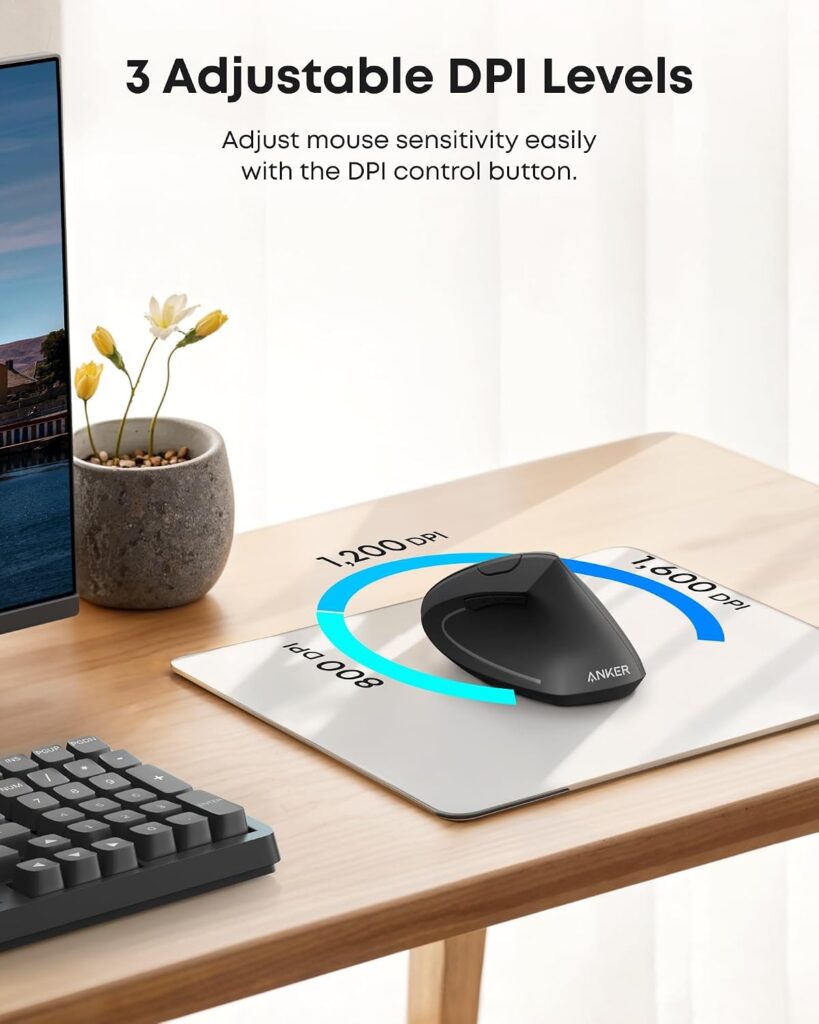
Quick Verdict: This is the Anker model with by far the most customer feedback, over 53,000 ratings at 4.2 stars, and it’s the one I’d point most office workers toward first. It uses a 2.4G USB receiver rather than Bluetooth, which tends to be more consistent for cursor tracking than Bluetooth-only mice.
Best For: Desktop and laptop users who want a dependable wireless vertical mouse without a premium price tag.
Key Specifications
- 800 / 1200 / 1600 DPI adjustable optical tracking
- 5 buttons, right-hand orientation
- 2.4G wireless via USB receiver (not Bluetooth)
- Powered by 2 AAA batteries (not included)
- Auto power-save after 8 minutes of inactivity
- 18-month warranty
- Amazon listing price: $29.99
What We Like
- Large, established review history gives a clearer picture of long-term reliability than newer competitors
- 2.4G receiver connection is typically more stable than Bluetooth for everyday cursor movement
- Back/forward buttons are genuinely useful for browsing
What We Don’t Like
- Right-hand only, left-handed users need to look elsewhere
- Requires 2 AAA batteries that aren’t included in the box
- Amazon’s own listing data is inconsistent on weight, the “About this item” section states 3.4 oz, while the item specification table lists 4.5 oz. Check the current listing before assuming an exact figure.
Ergonomic Analysis The handshake grip design aims to reduce forearm pronation versus a flat mouse, consistent with the general research on vertical mouse design discussed above. The 8-minute auto power-save is a practical touch for battery life, though it means an occasional half-second delay waking the mouse after it’s been idle.
Who Should Buy It? Right-handed users who want a proven, widely reviewed wireless vertical mouse for daily office or remote work.
Who Should Skip It? Left-handed users, and anyone who strongly prefers rechargeable over battery-powered devices.
Value for Money: At $29.99, this sits mid-pack for a wireless vertical mouse. The review volume and consistent 4.2-star average make it a reasonably low-risk purchase for the price.
🛒 Check Price on Amazon2. Anker USB Wired Vertical Mouse; Best Budget Pick
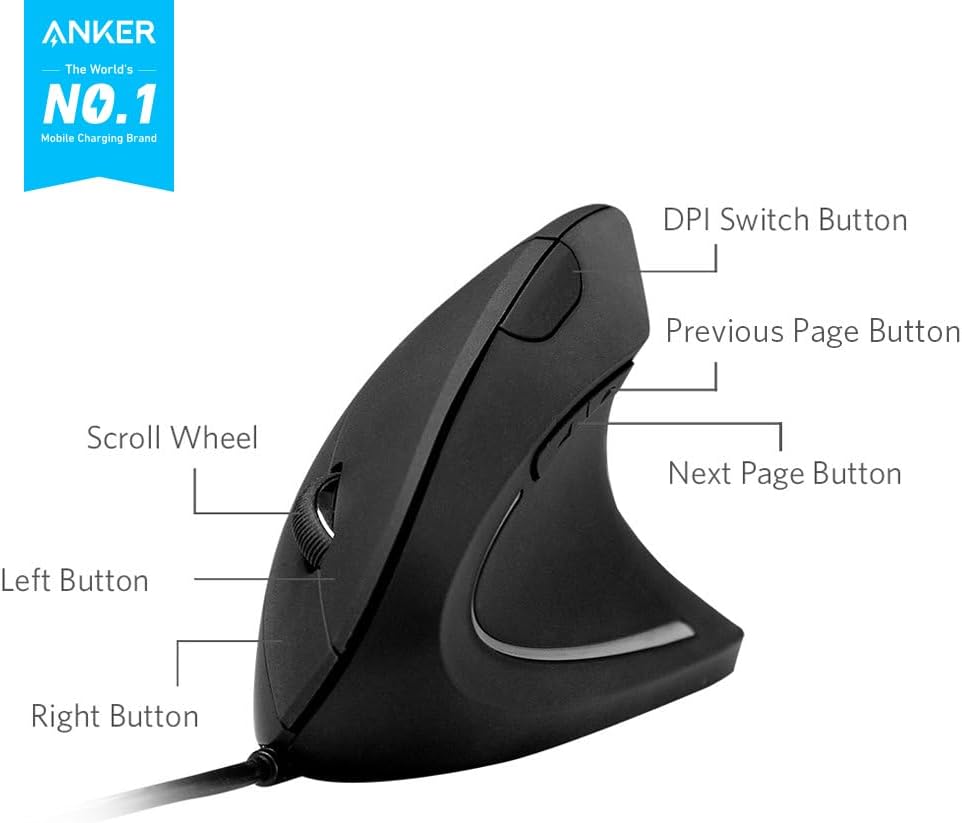
Quick Verdict: The simplest and cheapest way into a vertical mouse. Same ergonomic shape family as Anker’s wireless models, without any battery, receiver, or Bluetooth pairing to manage.
Best For: Budget-conscious buyers and anyone who wants to try a vertical mouse without committing much money.
Key Specifications
- 1000 / 1600 DPI optical tracking
- 5 buttons, ambidextrous shape
- Wired, 1.5m (4.9 ft) USB cable
- Dimensions: 120 x 62.8 x 74.8 mm
- 18-month warranty
- Amazon listing price: $16.99 (listed as 35% off a $25.99 list price)
What We Like
- Lowest price of any mouse in this comparison
- No batteries, charging, or pairing required
- Ambidextrous shape works for right- or left-handed use
What We Don’t Like
- The cable restricts how far the mouse can move from your computer, which matters if your desk setup is spread out
- Amazon’s listing again shows inconsistent weight data, “About this item” lists 5.3 oz while the specification table lists 3.36 oz
- No adjustable software or programmable buttons
Ergonomic Analysis Structurally, this is essentially the wired sibling of Anker’s wireless AK-98 line, so it should offer a similar handshake grip and forearm angle. Because it’s wired, there’s no power-saving delay or battery swap to think about, it simply works when plugged in, which some users prefer for consistency.
Who Should Buy It? Anyone testing whether a vertical mouse suits them before spending more, or anyone who wants a no-frills, always-on connection.
Who Should Skip It? Users who need to move the mouse far from their computer, or who specifically want a cable-free desk.
Value for Money: Excellent. This is one of the lowest-cost ways to try genuine vertical ergonomics. If you want to compare it against other options at this price point, see our ergonomic mouse under $20 guide.
🛒 Check Price on Amazon3. Anker 2.4G Wireless Vertical Ergonomic Optical Mouse (Renewed); Best Renewed Value
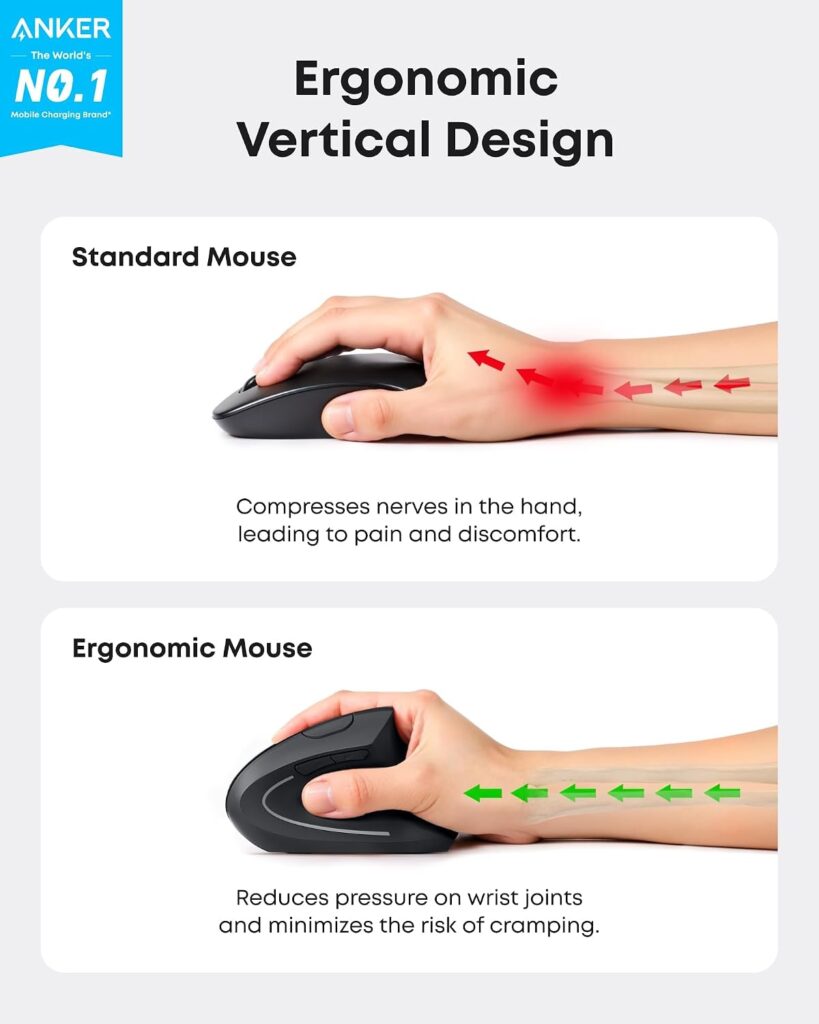
Quick Verdict: This is Amazon Renewed stock of an older Anker wireless vertical mouse, meaning it’s inspected and refurbished, not brand new. If you’re comfortable with that trade-off, it’s a way to get wireless vertical ergonomics at close to wired pricing.
Best For: Buyers comfortable with certified renewed electronics who want wireless convenience without paying full new-unit price.
Key Specifications
- 800 / 1200 / 1600 DPI optical tracking
- 5 buttons, ambidextrous shape
- 2.4G wireless connection
- Compatible with laptop, desktop, PC, and Mac
- Range listed at approximately 10 meters
- 90-day limited warranty (renewed condition)
- Amazon listing price: $19.89 (listed as 34% off a $29.99 new price)
What We Like
- Meaningfully cheaper than Anker’s current-generation wireless model
- Ambidextrous grip, unlike the AK-98ANWVM-UBA’s right-hand-only shape
- Broad OS compatibility listed, including Linux, multiple Windows versions, and macOS
What We Don’t Like
- Renewed condition means a shorter, 90-day warranty compared with 18 months on Anker’s new models
- As a Renewed listing, cosmetic wear or a previously opened box is possible even if functionally tested
- Fewer total reviews (1,067) than the current-generation model, so the feedback pool is smaller
Ergonomic Analysis Design-wise, this is the same general handshake-grip category as Anker’s other vertical mice, just from an earlier hardware revision sold through the Renewed program. The ergonomic shape and DPI range are comparable to Anker’s newer wireless model.
Who Should Buy It? Buyers who are specifically shopping Amazon Renewed and want to save money on a wireless vertical mouse, and who don’t need a long warranty window.
Who Should Skip It? Anyone who wants a guaranteed-new product or a longer warranty, the standard wired or current wireless Anker models are safer choices.
Value for Money: Reasonable if you go in with clear expectations about renewed condition and the shorter warranty. It is not automatically “better value” than the wired model, which is both cheaper and comes new with a longer warranty.
🛒 Check Price on Amazon4. TECKNET Ergonomic Mouse; Best for Multi-Device Switching
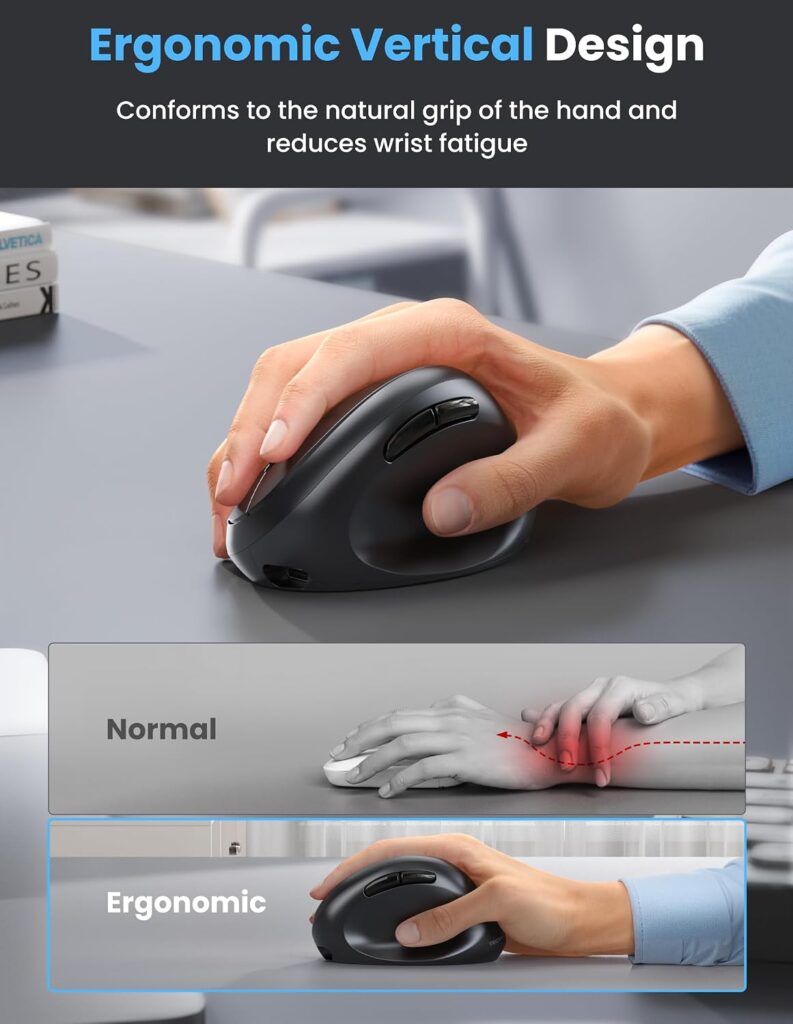
Quick Verdict: The TECKNET stands out in this group for connectivity flexibility, Bluetooth 5.0/3.0 plus a 2.4G USB receiver, with the ability to switch between up to three paired devices. It also has the highest DPI ceiling of any mouse here at 4800.
Best For: People who regularly move between a laptop, desktop, and tablet, or who want one mouse for both work and personal devices.
Key Specifications
- 6 adjustable DPI levels, 800–4800 DPI
- 6 buttons, right-hand orientation, built for a 52° vertical angle
- Bluetooth 5.0/3.0 and 2.4G USB receiver connectivity
- 600mAh rechargeable battery, up to roughly 2 months per charge (manufacturer-stated)
- USB-C charging cable included
- 36-month support for registered users
- Amazon listing price: $24.99 (with a listed coupon bringing it to $20.99)
What We Like
- Genuinely useful multi-device switching for people juggling several machines
- Rechargeable battery removes the need to buy AAA batteries
- Widest DPI adjustment range in this comparison, useful if you also do design or gaming work
What We Don’t Like
- Forward and back buttons are explicitly listed as not functional on Mac
- The “52° angle fits S/M hands like a glove” framing and “99% noise reduction” figure are manufacturer marketing claims rather than independently verified figures
- Right-hand only, so left-handed users are excluded
Ergonomic Analysis TECKNET markets this at a 52° vertical angle, which sits within the range ergonomics research associates with reduced forearm muscle activity compared with a flat mouse. The “S/M hands” framing is worth taking at face value from the manufacturer rather than as an independently tested claim, hand fit is genuinely subjective and worth checking against your own hand size if possible.
Who Should Buy It? Multi-device users who want Bluetooth flexibility and don’t mind a manufacturer-stated (not independently verified) comfort claim.
Who Should Skip It? Mac users who rely on back/forward navigation buttons, and users with large hands who may find the compact shell tight.
Value for Money: Strong. At its coupon price, the TECKNET undercuts the wireless Anker model while adding Bluetooth and a wider DPI range, the main trade-off is Mac button compatibility.
🛒 Check Price on Amazon5. seenda MOU-302; Best for Quiet Offices and Video Calls
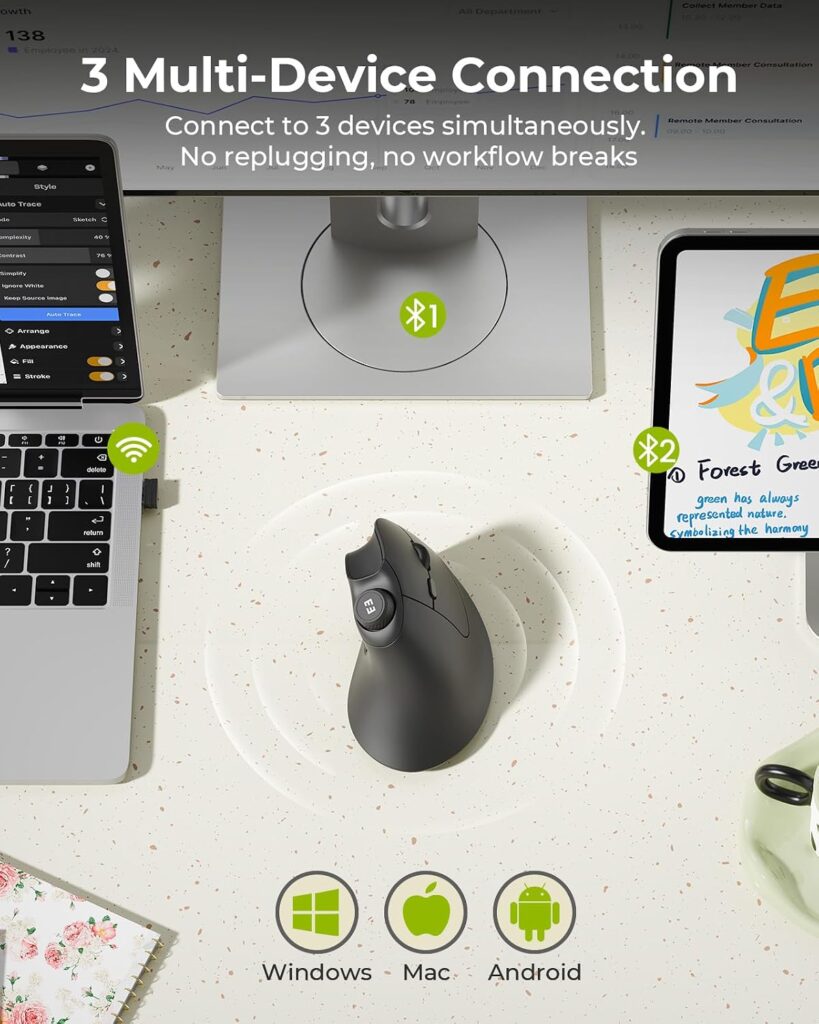
Quick Verdict: The seenda’s standout feature is a built-in volume knob and consistently silent clicks, making it a good fit for anyone on frequent video calls or working in a shared, noise-sensitive space.
Best For: Remote workers on frequent calls, and anyone in an open office or shared household space who doesn’t want audible clicking.
Key Specifications
- Adjustable DPI: 1000 / 1600 / 2400
- 7 buttons including a dedicated volume control, right-hand orientation
- Bluetooth (2 device slots) plus 2.4G USB receiver, 3-device switching total
- 500mAh built-in battery, up to roughly 2 months per charge (manufacturer-stated)
- USB-C charging
- 2-year manufacturer warranty
- Amazon listing price: $19.99, Amazon’s Choice badge on the listing
What We Like
- Volume knob genuinely useful for calls and media without switching windows
- Longer 2-year warranty than most models in this comparison
- 4.6-star rating despite fewer total reviews than the top-selling Anker model
What We Don’t Like
- Heaviest mouse in this comparison at 6.4 oz, which some users may notice over long sessions
- Marketed for small/medium hands specifically, may feel undersized for larger hands
- Only 1,684 reviews at the time of writing, a smaller sample than the Anker AK-98 model
Ergonomic Analysis The handshake grip and neutral wrist positioning follow the same general design logic as the other vertical mice here. The added ergonomic-adjacent benefit is the noise reduction, which doesn’t directly relate to wrist strain but does reduce disruption in shared spaces, a practical comfort factor that’s easy to overlook when comparing specs on paper.
Who Should Buy It? Anyone prioritizing quiet clicks and multi-device convenience, particularly people who take frequent video calls.
Who Should Skip It? Users with larger hands, or anyone who wants the lightest possible mouse for extended sessions.
Value for Money: Good. The 2-year warranty and Amazon’s Choice badge, combined with a sub-$20 price, make this a reasonable option for the quiet-office use case specifically.
🛒 Check Price on Amazon6. Lekvey Ergonomic Mouse; Best Battery Life
Quick Verdict: Lekvey’s headline claim is roughly 150 hours of continuous use per charge, the longest stated battery life in this comparison, and the largest of the 15,000+ review count models here.
Best For: Users with medium-to-large hands who don’t want to think about charging often.
Key Specifications
- 3 DPI levels: 800 / 1200 / 1600
- 6 buttons, right-hand orientation, recommended for medium or large hands
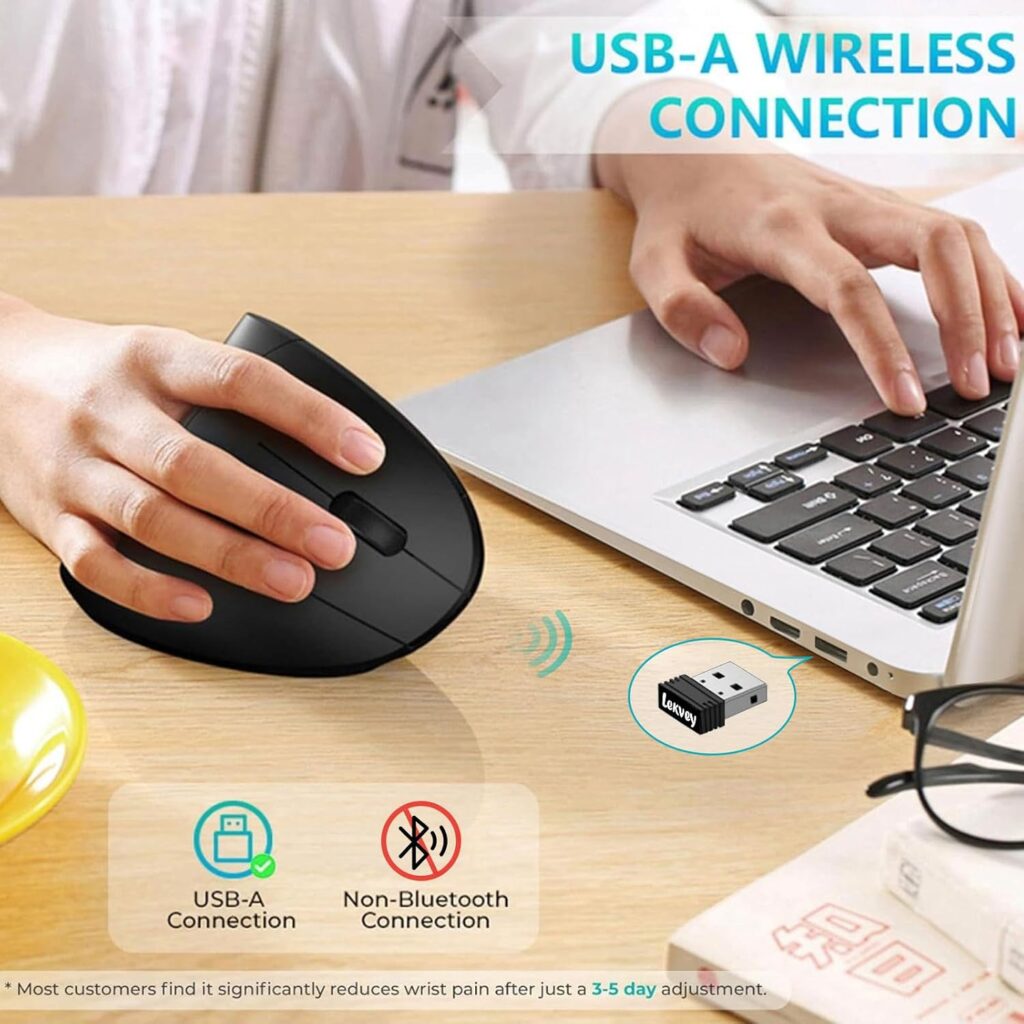
- 2.4G wireless via nano USB receiver (no Bluetooth)
- Rechargeable battery, manufacturer-stated up to 150 hours per charge
- Dimensions: 5.0″ x 3.0″ x 2.5″
- 36-month manufacturer warranty
- Amazon listing price: $29.99
What We Like
- Long stated battery life reduces how often you need to plug in
- Plug-and-play nano receiver, no Bluetooth pairing required
- Large review base (15,472 ratings) for a mid-tier price point
What We Don’t Like
- Explicitly sized for medium/large hands, the listing itself notes it isn’t intended for smaller hands
- No Bluetooth option, so it always ties up a USB port
- 4.3-star average is the lowest of the rechargeable models in this comparison
Ergonomic Analysis Lekvey’s listing states the manufacturer’s own view that “most customers find it significantly reduces wrist pain and becomes very comfortable after just a 3-5 day adjustment”, that’s a manufacturer claim, not an independently verified study result, and adjustment periods vary meaningfully by person. The handshake grip principle is consistent with the general vertical mouse research discussed earlier in this guide.
Who Should Buy It? Users with medium or large hands who want long battery life and don’t need Bluetooth.
Who Should Skip It? Anyone with small hands, or anyone who specifically wants Bluetooth multi-device support.
Value for Money: Solid if your hand size fits the intended range. At $29.99, it’s priced the same as the top-pick Anker model, so hand size and battery-life preference are the deciding factors between the two.
🛒 Check Price on Amazon7. AOC Ergonomic Mouse, Best for Small Hands
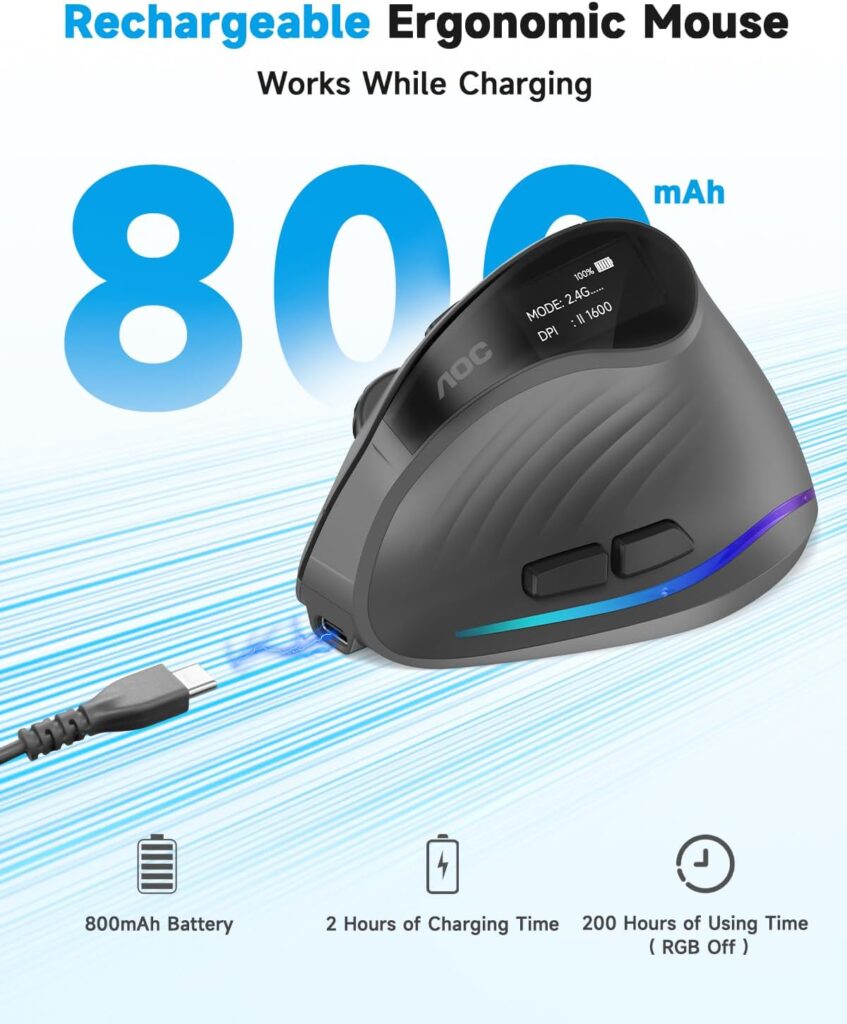
Quick Verdict: AOC’s model packs in the most features of this group, triple connectivity, an LED battery display, and programmable RGB buttons, but its own listing explicitly recommends it for small-to-medium hands and notes it isn’t ideal for large hands.
Best For: Users with small or medium hands who want a feature-rich vertical mouse and don’t mind a slightly higher price.
Key Specifications
- 5 adjustable DPI levels, up to 4800 DPI
- 7 buttons, fully programmable, right-hand orientation, 52° vertical angle
- Triple connectivity: Bluetooth 5.4, 2.4GHz receiver, and wired USB-A
- 800mAh rechargeable battery, up to 200 hours (manufacturer-stated, without RGB active) or 40+ hours with RGB on
- Type-C charging with use-while-charging support
- LED battery percentage display
- 12-month warranty plus 45-day return window
- Amazon listing price: $33.99 (gray) / $49.99 (black)
What We Like
- Most connection options of any mouse in this comparison, useful if you regularly switch setups
- Programmable buttons and an LED battery indicator are genuinely convenient extras
- Only the left/right click buttons are marketed as quiet, worth knowing if silence across all buttons matters to you
What We Don’t Like
- The listing itself notes it’s “not recommended for large hands”, a rare case of a brand being upfront about a real limitation
- Only 232 reviews at the time of writing, a much smaller sample than most other models here, so long-term reliability is harder to judge
- Higher price than most of this comparison, especially in the black colorway at $49.99
Ergonomic Analysis The 52° angle and compact shell are aimed specifically at users with smaller hands, which is a genuinely useful differentiator, several other vertical mice in this comparison assume an average-to-large hand size by default. The RGB lighting and programmable buttons don’t affect ergonomics directly, but the LED battery display is a small practical touch that avoids unexpectedly running out of charge mid-task.
Who Should Buy It? Users with small-to-medium hands who want a well-equipped vertical mouse and value connection flexibility.
Who Should Skip It? Users with large hands (per the brand’s own guidance), and anyone prioritizing a large, established review history before buying.
Value for Money: Fair, assuming the hand-size fit is right. The feature set justifies the premium over the basic Anker models, but the small review count makes it a slightly higher-risk purchase than the more established options here.
🛒 Check Price on AmazonFull Comparison Table
| Product | Type | Key Ergonomic Feature | Weight | Connectivity | Rating |
|---|---|---|---|---|---|
| Anker AK-98ANWVM-UBA | Wireless (2.4G) | Handshake grip, right-hand shape | ~3.4–4.5 oz (listing varies) | USB receiver | 4.2/5 |
| Anker Wired | Wired | Ambidextrous handshake grip | ~3.4–5.3 oz (listing varies) | USB cable (1.5m) | 4.4/5 |
| Anker Wireless (Renewed) | Wireless (2.4G), Renewed | Ambidextrous handshake grip | 3.4 oz | USB receiver | 4.2/5 |
| TECKNET | Wireless (BT + 2.4G) | 52° angle, sized for S/M hands | 5.0 oz | Bluetooth + receiver | 4.6/5 |
| seenda MOU-302 | Wireless (BT + 2.4G) | Handshake grip, silent clicks | 6.4 oz | Bluetooth + receiver | 4.6/5 |
| Lekvey | Wireless (2.4G) | Handshake grip, medium/large hands | 3.36 oz | USB receiver | 4.3/5 |
| AOC | Wireless (BT/2.4G) + Wired | 52° angle, sized for S/M hands | 3.68 oz | Bluetooth, receiver, or USB-A | 4.4/5 |
Decision Framework: Which Product Should You Buy?
Choose the Anker AK-98ANWVM-UBA if: you want the most widely reviewed, dependable option and you’re right-handed with average-to-large hands.
Choose the Anker Wired Mouse if: budget is the top priority and you don’t mind a cable, or you want to test whether vertical mice suit you before spending more.
Choose the Anker Renewed Mouse if: you’re comfortable buying Amazon Renewed electronics and want wireless convenience close to wired pricing.
Choose the TECKNET if: you regularly switch between multiple devices and want the widest DPI range in this comparison.
Choose the seenda MOU-302 if: you’re on frequent video calls, work in a shared or quiet space, or want the added convenience of a volume knob.
Choose the Lekvey if: you have medium-to-large hands and want to minimize how often you charge the mouse.
Choose the AOC if: you have small-to-medium hands and want the most connectivity options and programmable features, and you’re comfortable with a smaller review history.
Common Mistakes to Avoid When Buying a Vertical Mouse
- Buying based only on star rating. A 4.6-star mouse with 1,600 reviews and a 4.2-star mouse with 53,000 reviews both carry useful signal, a bigger sample generally gives a more reliable picture.
- Ignoring hand size. Several models in this comparison explicitly state they aren’t a good fit for large hands, check dimensions before assuming “ergonomic” automatically means “fits me.”
- Assuming vertical automatically means comfortable. Some users need an adjustment period, and a small number never adapt to a fully vertical grip. Try to buy from a retailer with a reasonable return window.
- Overlooking connectivity trade-offs. A 2.4G receiver ties up a USB port; Bluetooth doesn’t, but can be less consistent for fast cursor movement on some setups.
- Skipping the warranty terms. Renewed products and budget models often carry shorter warranties, factor that into the price comparison, not just the sticker price.
- Expecting a mouse alone to fix existing pain. A vertical mouse addresses one part of workstation ergonomics. Desk height, monitor position, and chair support all matter too.
- Not checking Mac compatibility for extra buttons. Several models here note that forward/back buttons don’t function on macOS, worth confirming if you’re on a Mac.
Best Practices for Using a Vertical Mouse
- Keep the mouse close to your body rather than reaching forward for it, a mouse placed too far away encourages shoulder and arm strain regardless of its shape.
- Give yourself a genuine adjustment period of several days to a couple of weeks before deciding whether the grip suits you.
- Pair the mouse with a properly adjusted desk and chair height; a vertical mouse can’t compensate for a desk that’s too high or too low.
- Take short movement breaks through the day. A NIOSH study of data-entry workers found that adding several short supplementary breaks to a standard two-break schedule reduced musculoskeletal and eye discomfort without lowering productivity. You don’t need a rigid schedule, a few minutes away from the mouse every hour or so is a reasonable starting point.
- If you switch from a flat to a vertical mouse, expect a brief drop in precision while you adapt, this is normal and typically improves within a week or two.
Alternatives Worth Considering
If none of these seven quite fit, our best vertical mouse 2026 guide rounds up additional options across more price points, and the Logitech MX Vertical review covers a premium alternative with more refined tracking and app-based customization for anyone willing to spend significantly more than any product listed here.
Frequently Asked Questions
Is the Anker vertical mouse actually good?
Based on its specifications and its large review base (53,468 ratings at 4.2 stars for the wireless AK-98 model), it’s a reasonably well-regarded budget-to-mid-range vertical mouse. It doesn’t have the advanced software or precision tracking of premium options like the Logitech MX Vertical, but it covers the core ergonomic shape at a lower price.
Are ergonomic mice really better than a standard mouse?
For many users, yes, in the sense that a vertical grip reduces forearm pronation compared with a flat mouse, based on general ergonomics research. It isn’t a universal fix, and comfort is genuinely individual, some people adapt easily, others take longer or find they prefer a different design entirely.
Is a vertical mouse good for long work hours?
It can be, since the handshake grip is designed to keep the forearm and wrist in a more neutral position than a flat mouse over extended use. Even with a vertical mouse, taking regular breaks and adjusting your overall desk setup still matters for long working sessions.
How long does it take to get used to a vertical mouse?
Most users need roughly three days to two weeks to adapt to the grip and regain their usual precision. A small number of people don’t adjust well to a fully vertical design and prefer a moderately angled mouse instead.
What is the difference between the Anker wired and wireless vertical mouse?
The wired model uses a 1.5m USB cable and needs no batteries, while the wireless AK-98ANWVM-UBA uses a 2.4G USB receiver and runs on 2 AAA batteries. The wired version is cheaper and has one less thing to maintain; the wireless version offers more desk flexibility.
Is the Anker Renewed vertical mouse safe to buy?
Amazon Renewed products are inspected and tested to work like new, but they are not new units and carry a shorter warranty, 90 days on this listing compared with 18 months on Anker’s current wireless model. It’s a reasonable option if you’re comfortable with that trade-off.
Which vertical mouse is best for small hands?
Of the products in this comparison, the AOC and seenda MOU-302 are both explicitly built around smaller hand sizes, with a 52° angle and more compact shells. The Lekvey, by contrast, is sized for medium-to-large hands and may feel bulky for smaller hands.
Can a vertical mouse cure carpal tunnel syndrome or wrist pain?
No. Ergonomic products like vertical mice may help reduce strain and support a more neutral position, but they are not a medical treatment and can’t diagnose or cure conditions like carpal tunnel syndrome, tendinitis, or arthritis. NIOSH’s ergonomics and musculoskeletal disorders research frames prevention as a combination of task design, posture, and workplace changes, not any single product. For persistent or worsening pain, consult a doctor or physical therapist.
Do vertical mice work well for gaming?
They can, though most gaming mice are still flat-profile for precision aiming. Several products here list DPI ranges suitable for gaming (up to 4800 DPI on the TECKNET and AOC), but competitive gamers may still prefer a dedicated gaming mouse for the fastest, most precise tracking.
Are Bluetooth or 2.4G wireless mice better for vertical mice specifically?
Neither is universally better, 2.4G (via USB receiver) is often described as more consistent for fast cursor movement, while Bluetooth avoids using up a USB port and typically supports switching between more devices. Several models in this comparison, like the TECKNET and seenda, include both so you can choose per situation.
Final Verdict
If you want the safest, most broadly proven pick, go with the Anker 2.4G Wireless Ergonomic Mouse (AK-98ANWVM-UBA) its, review volume alone makes it the lowest-risk choice in this group. If price is your main concern, the Anker USB Wired Vertical Mouse delivers the same core ergonomic shape for under $20. If you have smaller hands, the AOC or seenda MOU-302 are better-fitted options than the standard Anker shape. And if you’re constantly switching between devices, the TECKNET is worth the extra connectivity.
There’s no single “best” vertical mouse here, the right choice depends on your hand size, your budget, and how many devices you need to pair it with. Whichever model you land on, give it a genuine adjustment period before deciding whether it’s working for you.
Compare the latest prices and availability before making your decision, Amazon pricing and stock levels change regularly.





