Best Wireless Ergonomic Keyboard 2026: Which One Fits Your Desk and Your Hands?
If your wrists feel tired after a long day of typing, the keyboard is one of the first things worth looking at. It is also one of the easiest things to get wrong, because “ergonomic” gets printed on almost every box.
I put this guide together to cut through that. Below you will find seven cordless ergonomic keyboards, what each one is genuinely good at, where each one falls short, and who should skip it. Prices run from roughly $36 to $250, so the gap between options is large.
If you are still deciding what type of keyboard you need, our guide to the best ergonomic keyboards for 2026 covers split, compact and wireless designs side by side. This article focuses on the wireless ones.
⌨️ Quick Answer: Best Wireless Ergonomic Keyboards at a Glance
Seven cordless ergonomic keyboards, each chosen for a different type of user. Prices are from Amazon listings at the time of writing and can change.


What Is the Best Wireless Ergonomic Keyboard?
The Logitech Ergo K860 is the best wireless ergonomic keyboard for most people who type for several hours a day and have the desk space for a full-size, curved split design with a built-in palm rest. If you want to spend far less, the TECKNET wireless ergonomic keyboard offers a split layout, rechargeable battery and Bluetooth plus 2.4GHz connectivity at a much lower price. For a smaller footprint, the Logitech Wave Keys is the more compact choice.
Are wireless ergonomic keyboards worth it? They can be, if your current keyboard pushes your wrists outward or your forearms flat and rotated. A well-set-up ergonomic keyboard may help you hold a more neutral wrist and forearm position. It is not a medical treatment, and the benefit depends on fit, desk height and how you actually sit.
Quick Verdict Table
| Product | Best For | Main Strength | Main Limitation | Rating | Link |
|---|---|---|---|---|---|
| Logitech Ergo K860 | Heavy daily typists with desk space | Curved split frame + palm rest + negative tilt | High price and wide footprint | 4.6/5 | Check Price |
| Kensington Pro Fit Ergo | Shared or messy desks | Spill-proof keys + 3-year warranty | Lowest rating; no palm rest listed | 3.9/5 | Check Price |
| X9 Performance Wireless Ergonomic Keyboard | Windows desktop users | Split layout + cushioned rest at mid price | No Bluetooth listed; big and heavy | 4.0/5 | Check Price |
| Logitech Wave Keys | Small desks and first-time buyers | Compact size + Easy-Switch | Not split; 1-year warranty | 4.3/5 | Check Price |
| Nulea Ergonomic Split Keyboard (RT05) | Mac/Windows users switching devices | Dual wireless + USB-C + 3 tilt levels | Not water resistant; heavy | 4.2/5 | Check Price |
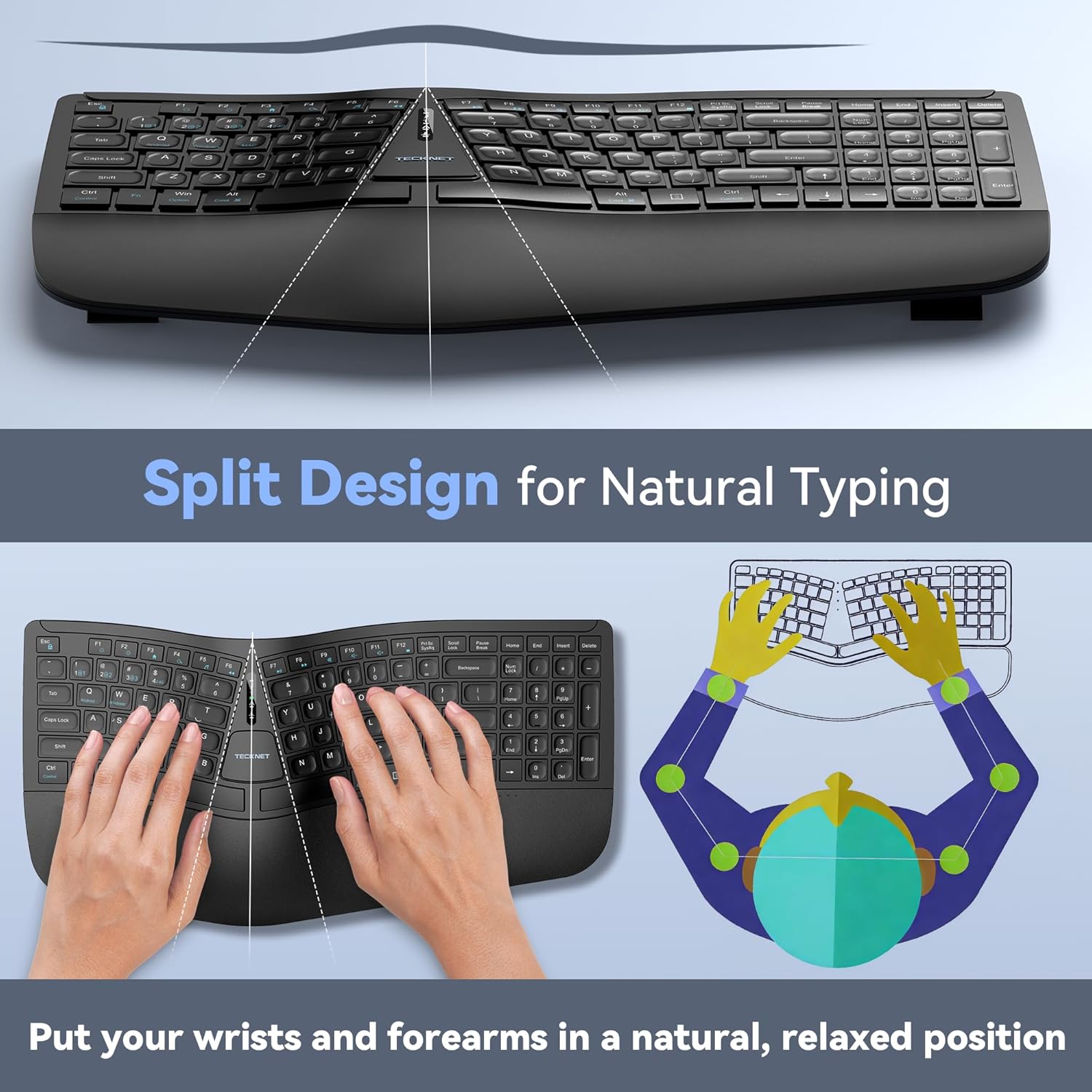
| TECKNET Wireless Ergonomic Keyboard | Budget buyers testing a split layout | Lowest price with split layout + wrist rest | Inconsistent listing details; upward tilt only | 4.3/5 | Check Price |
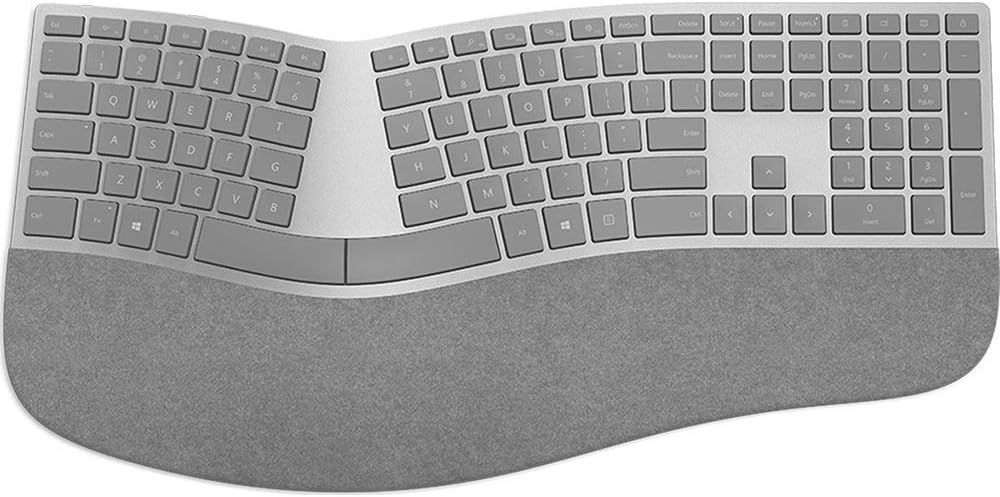
| Microsoft Surface Ergonomic Keyboard | Surface and Windows users who value design | Slim arc + Alcantara palm rest | Highest price; older Bluetooth | 4.0/5 | Check Price |
What Is a Wireless Ergonomic Keyboard?
A wireless ergonomic keyboard is a cordless keyboard shaped to reduce awkward wrist and forearm positions during typing. It usually connects by Bluetooth, a USB receiver (often called a 2.4GHz dongle), or both.
Most designs use one or more of these features:
- A split layout, where the keys are divided into a left and right half so your hands can sit closer to shoulder width.
- A curved or “wave” key arrangement, which follows the natural arc of your fingers.
- A built-in palm rest, which supports the heel of the hand between bursts of typing.
- Tilt or slope adjustment, which changes the angle of the keyboard.
You may also see it called a cordless ergonomic keyboard or a Bluetooth ergonomic keyboard. Those are the same category.
Wireless Typing Ergonomics: What Actually Changes
The point of an ergonomic keyboard is posture. A standard flat keyboard tends to hold your forearms palm-down and your wrists bent slightly outward toward the little finger, which is called ulnar deviation.
OSHA’s computer workstation guidance says keyboard selection and placement help reduce exposure to awkward postures, repetition and contact stress. It also says alternative keyboards help maintain neutral wrist postures, but that available research does not provide conclusive evidence that they prevent discomfort and injury. I think that is the honest way to frame it.
Research Insight: A report hosted by the CDC’s NIOSH library studied commercially available split and vertically inclined keyboards with more than 90 clerical typists. When set up correctly, three split keyboards reduced mean wrist ulnar deviation from roughly 10 degrees to within 2.5 degrees of neutral. Participants practised on the alternative keyboard for at least 10 hours before testing.
What this means: Split designs can change wrist position in a lab setting. This is general research on the design approach. It does not prove that any keyboard in this article will prevent pain or injury.
Practical example: If you type with your wrists angled outward on a flat keyboard, a split layout may let your hands sit more in line with your forearms. Give yourself time to adapt, because the participants in that study practised before being measured.
Research Insight: In a 2009 study of 24 touch typists published in Ergonomics, keyboard slopes in the mid-range of those tested, 0 to -4 degrees, produced the least wrist extension and forearm pronation. A keyboard opening angle of about 15 degrees gave the best balance between reducing ulnar deviation and avoiding extra forearm rotation.
What this means: Slope and split angle both affect posture, but the study found mixed effects on different joints (wrist, forearm and elbow). That is a good argument for choosing a keyboard with adjustable tilt rather than a fixed angle.
Practical example: A keyboard with tilt legs that include a 0 or negative setting, as the Logitech Ergo K860 lists (0, -4 and -7 degrees), gives you room to experiment with a slope in that general range. That is a design observation, not proof the K860 will suit your body.
Research Insight: A Cochrane systematic review of randomised controlled trials in office workers concluded that, although ergonomic interventions are likely to reduce the risk of upper limb and neck musculoskeletal disorders, the evidence is unclear.
What this means: The research supports looking at your whole setup, but it has not established that any particular keyboard prevents pain. Treat the products below as comfort and positioning tools, not guaranteed fixes.
Practical example: Change one thing at a time. Try the new keyboard for a couple of weeks, adjust your chair and desk height at the same time, and add short movement breaks. If you still have persistent discomfort, speak to a healthcare professional rather than buying another accessory.
How to Choose a Wireless Ergonomic Keyboard: 8 Factors That Matter
1. Layout shape: split, curved or wave
A true split keyboard separates the halves, while a wave or curved keyboard keeps one piece with a sculpted key arrangement. Split designs generally change wrist angle more, but they also take longer to get used to.
If you want a gentler step away from a standard keyboard, a wave design such as the Logitech Wave Keys is easier to adapt to. Our best split ergonomic keyboard guide goes deeper if you want to commit to a full split.
2. Palm rest and tilt
OSHA’s wrist and palm support guidance says opinions vary, but proper use has been shown to reduce muscle activity and help keep wrist angles neutral. It also warns that resting the wrist on a support while typing may limit wrist motion and could increase awkward postures.
In practice, that means a palm rest is for pauses. Keep your hands floating over the keys while you type, and let the heel of the hand (not the wrist) touch the pad when you stop.
Check whether the tilt adjusts. Some of these keyboards offer a negative or flat setting, and some listings do not mention tilt at all.
3. Connectivity: Bluetooth or 2.4GHz receiver
Bluetooth needs no receiver and lets you pair with laptops, tablets and sometimes phones. A 2.4GHz USB receiver usually gives plug-and-play pairing but uses a USB port and is often tied to one computer.
Several keyboards below offer both. That is the more flexible setup if you move between devices.
4. Power: replaceable batteries or rechargeable
Replaceable batteries mean you swap and forget. Rechargeable keyboards use USB-C or a charging cable and need occasional charging, but you are not buying batteries.
Battery life claims are manufacturer figures and depend on usage and backlighting.
5. Operating system compatibility
This is the factor people skip. Amazon listings for some of these keyboards list different operating systems in different places, so confirm Windows, macOS, ChromeOS or iPadOS support on the manufacturer’s page before buying.
6. Size and desk space
Full-size split keyboards with palm rests are wide. Several here are around 46 to 48 cm wide, which pushes your mouse farther to the right.
Emily Richardson’s tip: Measure your desk and your keyboard tray before you buy. A compact ergonomic accessory can be a better choice for a small home office than a larger premium product with features that require extra desk space.
7. Key feel and layout learning curve
Membrane and scissor-style keys are common here and are generally quiet. Amazon’s switch-type fields are inconsistent across these listings, so if key feel matters to you, check the manufacturer’s specifications rather than the Amazon field.
Expect an adjustment period on any split or curved layout. Some keys you used to hit with the “wrong” hand will now sit on the other half.
8. Warranty and support
Warranties listed on these products range from one year to three years. Registration may be required for extended coverage, so read the fine print.
How These Keyboards Were Evaluated
At ErgoFixes, our product evaluations combine manufacturer specifications, verified retailer and Amazon listing data, customer feedback, review patterns, and ergonomic design analysis. We assess products across factors such as comfort, adjustability, materials, functionality, durability, and overall value, using multiple sources to provide a balanced and practical recommendation.
Best Wireless Ergonomic Keyboards Reviewed
1. Logitech Ergo K860; Best Overall
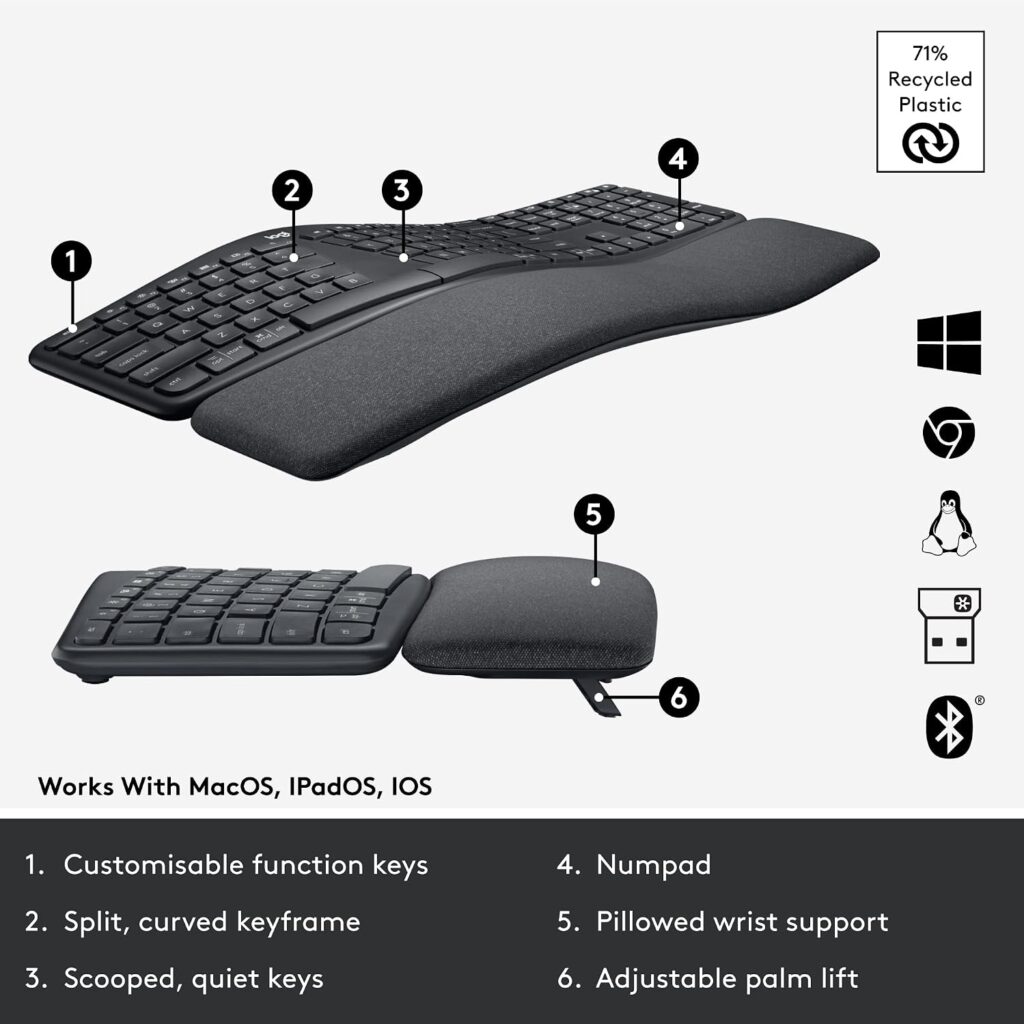
Quick Verdict: The K860 is the most complete wireless ergonomic keyboard in this group. It combines a curved split frame, a memory-foam palm rest, a full-size layout and a choice of Bluetooth or USB receiver. It is also expensive and wide, so it makes the most sense if you type a lot and have the desk space.
Best For: Daily heavy typists who want a full-size layout with strong built-in support.
Key Specifications:
- Connectivity: Bluetooth and USB receiver (included)
- Compatibility: Windows, macOS, Linux and ChromeOS per the listing
- Keys: 105, full-size layout
- Palm lift: tilt legs at 0, -4 and -7 degrees
- Size: 17.95 x 9.17 x 1.89 in (about 45.6 x 23.3 x 4.8 cm)
- Power: 2 AAA batteries (Logitech states up to 2 years of battery life, a manufacturer claim)
- Listed price: $149.99 | Rating: 4.4/5 (8,071 reviews)
What We Like:
- Curved, split key frame with a pillowed palm rest in one unit
- Tilt legs that include a negative slope option
- Bluetooth and USB receiver give you flexibility across computers
- Large review base compared with the others in this list
What We Don’t Like:
- The highest price here apart from the Microsoft Surface keyboard
- Wide enough that your mouse sits farther away unless you move it closer
- The split is gentle rather than fully separated, so it will not suit everyone who wants a dramatic split
Ergonomic Analysis: The curved split frame is designed to place the hands closer to a natural angle, and the palm rest gives the heel of the hand a soft surface to rest on between typing. Logitech’s launch announcement says the pillowed wrist rest offers 54 percent more wrist support and reduces wrist bending by 25 percent, and the Amazon listing says this is compared with a standard keyboard without a palm rest. Both figures come from the manufacturer, so treat them as a design target rather than independent proof. Our longer Logitech Ergo K860 review goes through the details.
Who Should Buy It? Office workers, writers and developers who type for hours and want a familiar full-size layout with palm support.
Who Should Skip It? Anyone with a small desk, anyone on a tight budget, and anyone who wants a very compact keyboard for travel.
Value for Money: It is a premium price, but the feature set (curved frame, palm rest, tilt legs, dual connectivity) covers most of what people actually want. If you will use it every day, the cost per hour of use is small.
🛒 Check Price on Amazon2. Kensington Pro Fit Ergo Wireless Keyboard (K75401US); Best Spill-Resistant Split
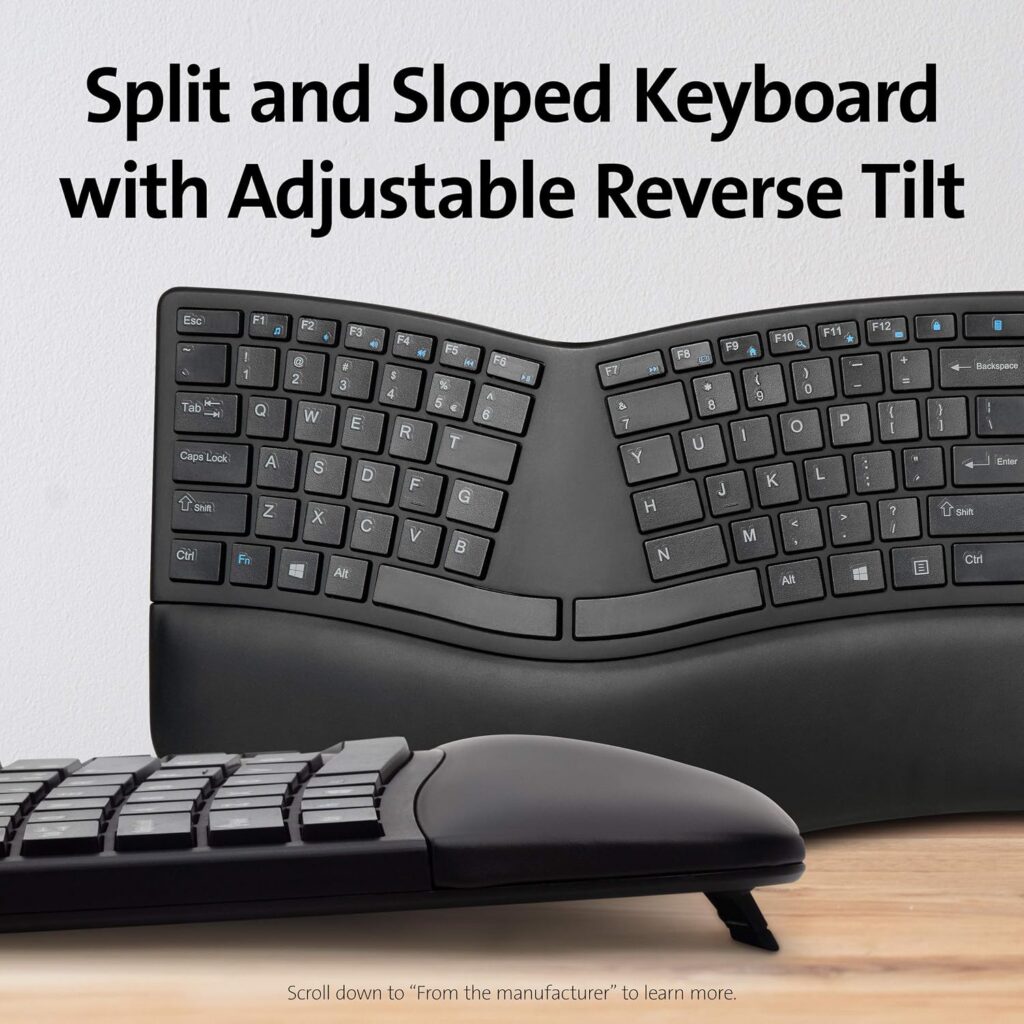
Quick Verdict: The Kensington Pro Fit Ergo is a split, sloped keyboard with dual wireless connectivity and a long 3-year warranty. It is among the lower-priced options here. It also has the lowest customer rating in this group, which I would not ignore.
Best For: Shared offices or messy desks where a spill-resistant keyboard matters.
Key Specifications:
- Connectivity: 2.4GHz receiver and Bluetooth 4.0 LE, with 128-bit AES encryption
- Compatibility: ChromeOS, macOS, Windows (listing states minimum versions of ChromeOS 134, macOS 14 and Windows 11)
- Keys: 104, two-section design with reverse tilt positions
- Size: 18.98 x 9.92 x 1.5 in (about 48.2 x 25.2 x 3.8 cm)
- Weight: 2.2 lb (about 1.0 kg)
- Warranty: 3 years
- Listed price: $52.87 (listing shows $62.99 list price) | Rating: 3.8/5 (1,726 reviews)
What We Like:
- Split and sloped design with reverse tilt positions
- Spill-proof keys; the listing says it meets MIL-STD-810H Method 504.3 for contamination by fluids
- Three-mode power-saving switch (2.4GHz, Bluetooth, off)
- 3-year warranty is the longest in this group, tied with TECKNET’s listed 36 months
What We Don’t Like:
- The 3.8-star rating is the lowest of the seven
- Bluetooth 4.0 is older, and the listed minimum operating systems are recent, so older computers may not be supported
- It is the widest keyboard in the group at nearly 19 inches
Ergonomic Analysis: The reverse tilt positions slope the keyboard away from you, which is designed to keep wrists flatter while typing. The split layout aims to let forearms sit at a more natural angle. There is no palm rest on the listing I reviewed, so you may want to add a separate wrist rest.
Who Should Buy It? Buyers who value a longer warranty and spill resistance and want a split layout without paying premium money.
Who Should Skip It? Anyone who wants a built-in palm rest, an older computer user, or anyone who prefers the strongest review scores.
Value for Money: The price is low and the warranty is strong, but the lower rating suggests checking recent customer reviews for recurring issues before buying. Spill resistance is not a license to pour coffee on it.
🛒 Check Price on Amazon3. X9 Performance Wireless Ergonomic Keyboard; Best Plug-and-Play 2.4GHz Split
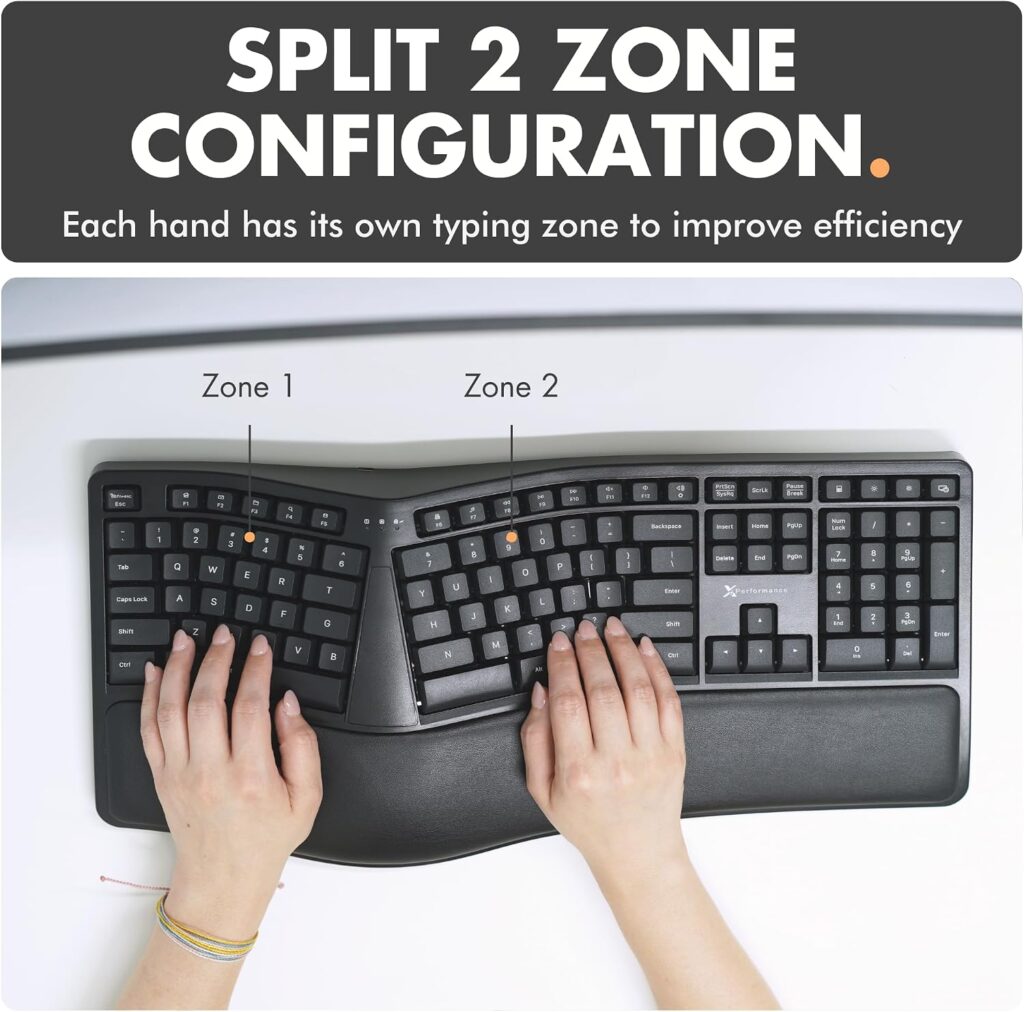
Quick Verdict: The X9 is a two-zone split keyboard with a cushioned wrist rest, a 2.4GHz USB receiver and a rechargeable battery at a modest price. It is straightforward, but it is big, heavy and, going by the listing, less flexible on connectivity than most of the others.
Best For: Windows desk users who want a split layout and a built-in cushion without paying Logitech prices.
Key Specifications:
- Connectivity: 2.4GHz USB-A receiver (listed range about 30 ft)
- Keys: 110, two-zone split with wrist cushion
- Power: 600 mAh internal rechargeable battery, charging cable included
- Size: 19 x 9.85 x 1.9 in (about 48.3 x 25.0 x 4.8 cm)
- Weight: 2.83 lb (about 1.28 kg)
- Warranty: up to 2 years
- Listed price: $59.99 | Rating: 4.3/5 (779 reviews), Amazon’s Choice
What We Like:
- Split two-zone layout with a soft wrist cushion
- Rechargeable battery that the listing says lasts months between charges
- Plug-and-play receiver with no software to install
What We Don’t Like:
- No Bluetooth is listed, so it needs a free USB-A port
- The listing’s operating system field says Windows, while the title mentions Chromebook use, so confirm compatibility before buying if you use a Mac
- Wide and heavy compared with most of the group, and fewer reviews than the Logitech models
Ergonomic Analysis: The two-zone split is designed to let your hands sit closer to shoulder width, and the wrist cushion gives some support during pauses. The listing does not describe adjustable tilt in detail, so I would not assume you can reach a negative slope.
Who Should Buy It? Windows desktop users who want a simple split keyboard at a mid-range price.
Who Should Skip It? Mac users, anyone who needs to switch between devices, and people with limited desk space.
Value for Money: Reasonable if the receiver-only setup suits you. If you want Bluetooth and multi-device switching, the Nulea or TECKNET offer more flexibility for a similar or lower price.
🛒 Check Price on Amazon4. Logitech Wave Keys; Best Compact Wireless Ergonomic Keyboard
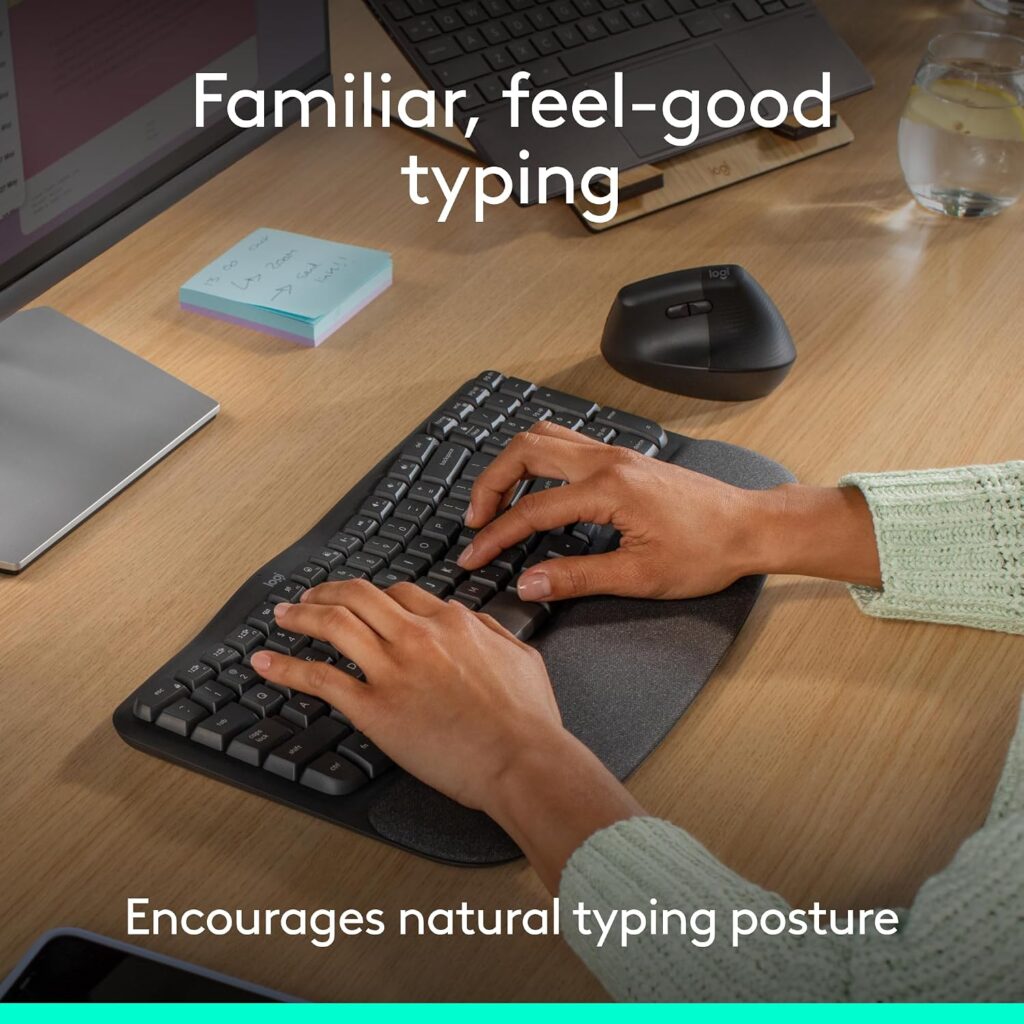
Quick Verdict: The Wave Keys is the gentlest step away from a regular keyboard. It has a wavy key arrangement, a memory-foam palm rest, Bluetooth and Logi Bolt receiver options, and a more compact footprint. It is not a true split design, so the posture change is more modest.
Best For: Smaller desks, people new to ergonomic keyboards, and users who switch between a laptop, tablet and phone.
Key Specifications:
- Connectivity: Bluetooth or Logi Bolt receiver, with Easy-Switch for up to 3 devices
- Layout: single-section wave design with cushioned palm rest
- Size: 14.8 x 8.62 x 1.18 in (about 37.6 x 21.9 x 3.0 cm)
- Weight: 2.16 lb (about 0.98 kg)
- Battery: Logitech says up to 3 years using the included batteries (manufacturer claim)
- Warranty: 1-year limited hardware warranty
- Listed price: $69.99 | Rating: 4.2/5 (3,093 reviews), Amazon’s Choice
What We Like:
- Compact for an ergonomic keyboard with a palm rest
- Multi-device switching for laptop, tablet and phone
- Customisable shortcuts through Logi Options+
- Very long listed battery life
What We Don’t Like:
- It is not a split keyboard, so it changes wrist and forearm position less than a true split
- The listing does not mention adjustable tilt
- The 1-year warranty is the shortest in this group, and some listing fields (connectivity, operating system) are inconsistent with the product description
Ergonomic Analysis: The wave shape follows the natural arc of the fingers and the palm rest supports the wrist. It suits people who want a more comfortable shape without relearning where their hands sit. Logitech’s own suggested pairing is the Lift vertical mouse, which is aimed at small to medium hands.
Who Should Buy It? Beginners, small-desk users, and anyone who moves between several devices.
Who Should Skip It? People who want a strong split or adjustable tilt.
Value for Money: Good for the brand, the compact size and the multi-device switching. If a stronger split is your priority, you will get more from the K860 or the Nulea.
5. Nulea Ergonomic Split Keyboard (RT05); Best Multi-Device Split
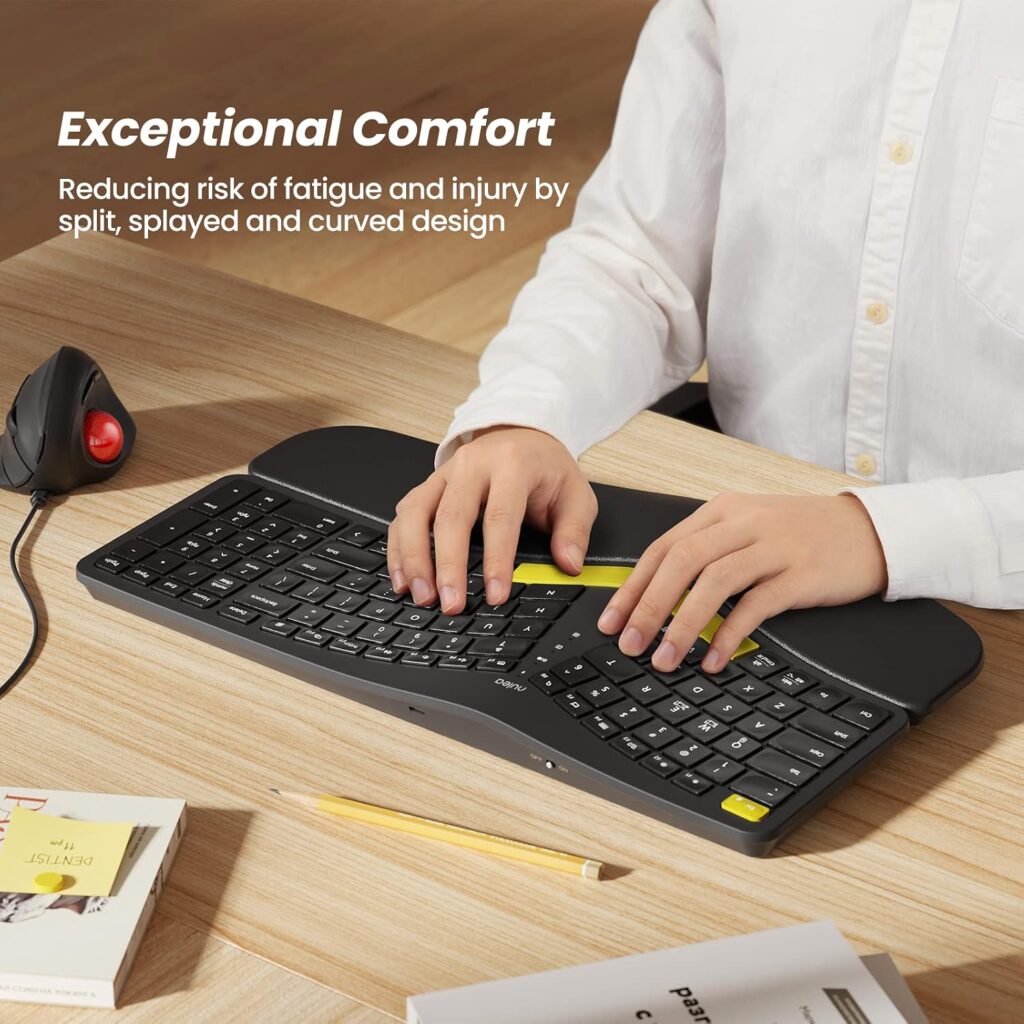
Quick Verdict: The Nulea is a split, curved wireless keyboard with Bluetooth, a 2.4GHz receiver, three-device switching, a large USB-C rechargeable battery and a backlight. It is feature-packed for the price. Its trade-offs are weight, a lack of water resistance and a backlight that you may not need.
Best For: Mac and Windows users who switch between a computer, tablet and phone and want a split layout.
Key Specifications:
- Connectivity: Bluetooth and 2.4GHz USB, up to 3 devices
- Compatibility: Windows, macOS, iOS and iPadOS per the listing
- Battery: 2000 mAh, USB-C charging
- Features: 7-colour backlight, 3 tilt levels, scissor-switch keys
- Size: 16.5 x 9.6 x 1.3 in (about 41.9 x 24.4 x 3.3 cm)
- Listed weight: 3.5 lb (about 1.6 kg); this may include packaging
- Warranty: 2 years
- Listed price: $64.99 | Rating: 4.2/5 (1,631 reviews)
What We Like:
- Dual wireless modes with one-tap device switching
- Large rechargeable battery and USB-C
- Three tilt levels from four adjustable legs
- Narrower than the Kensington, X9 and K860
What We Don’t Like:
- Not water resistant, according to the listing
- Backlighting drains battery, and the keyboard turns the backlight off below 10 percent charge
- Fewer premium-brand support channels than Logitech or Microsoft
Ergonomic Analysis: The split, splayed and curved layout is designed to reduce wrist bending and allow a more relaxed shoulder position. The three tilt options let you test different slopes. The listing describes a wrist rest, so check the product photos to confirm how it attaches.
Who Should Buy It? Hybrid workers who use more than one device and want a split design at a mid-range price.
Who Should Skip It? People who want a very light keyboard, and anyone who works near liquids.
Value for Money: Strong. Few keyboards at this price offer Bluetooth, a 2.4GHz receiver, USB-C charging and adjustable tilt together.
6. TECKNET Wireless Ergonomic Keyboard; Best Value
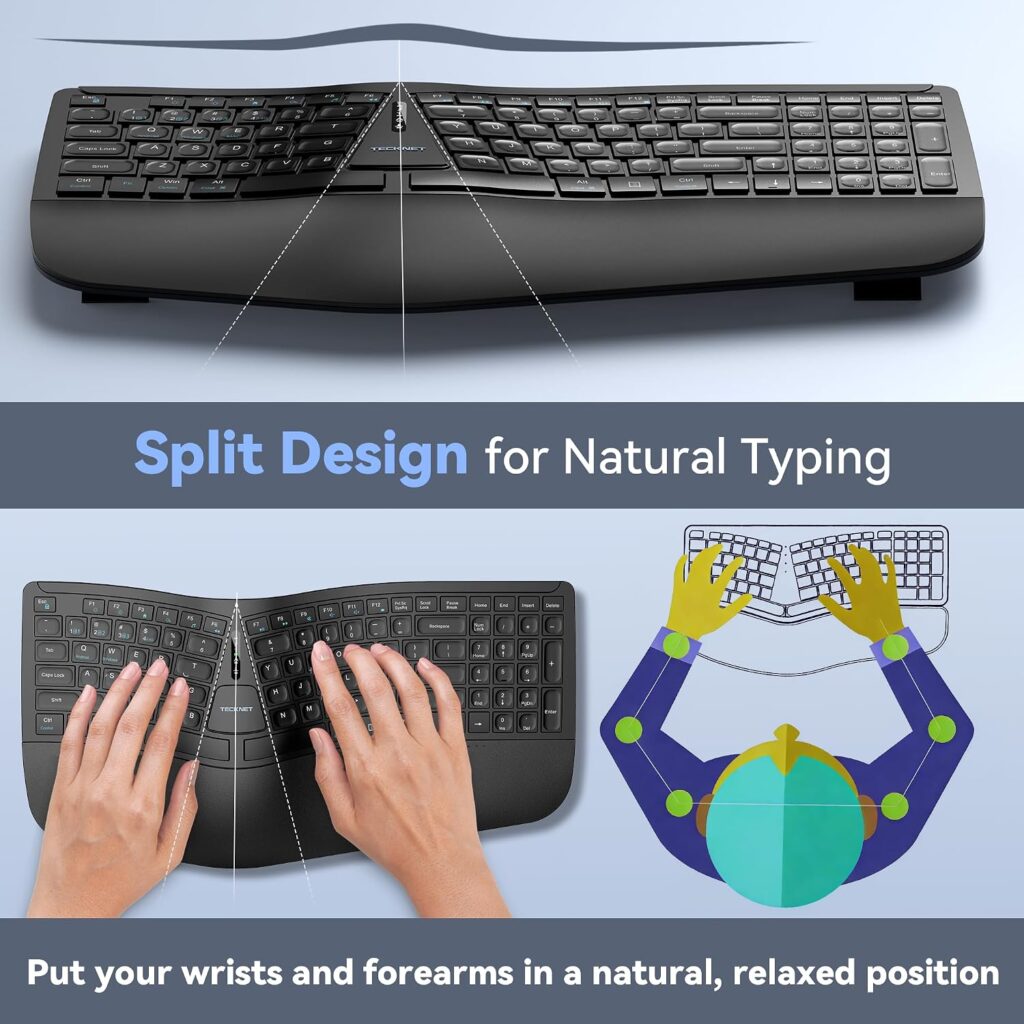
Quick Verdict: The TECKNET is the lowest-priced split ergonomic keyboard in this guide. It offers a curved, split key layout, a dual-density foam wrist rest, Bluetooth and 2.4GHz connectivity, and a rechargeable battery. The catch is that the Amazon listing contains some inconsistent details, so you should verify your variant before buying.
Best For: Budget-conscious buyers who want to try a split layout without spending much.
Key Specifications:
- Connectivity: Bluetooth 5.0 plus a USB wireless dongle, per the listing description
- Battery: 500 mAh rechargeable, USB-C, up to 200 hours of continuous use (manufacturer claim)
- Tilt: 4 stages (0, 1.2, 3 and 6.2 degrees)
- Wrist rest: dual-density foam with a stain-resistant fabric cover
- Weight: 2.31 lb (about 1.05 kg)
- Warranty: 36 months with registration (the listing’s detail table says 2 years)
- Listed price: $35.99 (a coupon price of $32.39 was shown on the listing) | Rating: 4.2/5 (1,540 reviews), Amazon’s Choice
What We Like:
- Lowest price in the group
- Split, curved layout with a cushioned wrist rest
- Rechargeable with USB-C and simultaneous charge and use
- Bluetooth and dongle connectivity
What We Don’t Like:
- The listing’s detail fields disagree with its description (operating system, layout and warranty), so confirm the exact model before purchase
- Tilt options are all positive slopes, so there is no flat or negative setting listed
- Less-established brand than Logitech, Microsoft or Kensington
Ergonomic Analysis: The curved key arrangement follows the arc of the fingers, and the foam wrist rest has a firmer base layer and a softer top layer, designed to support the wrist without sinking. Because the tilt options only slope upward, you may need to adjust your desk or chair height to keep your wrists neutral.
Who Should Buy It? Anyone who wants to test whether a split layout suits them before investing in a premium model.
Who Should Skip It? Users who want brand-backed software, negative tilt, or consistent documentation.
Value for Money: Excellent on paper. Check the coupon and the specific variant before ordering, since coupons can expire.
7. Microsoft Surface Ergonomic Keyboard (3RA-00022); Best Premium Design
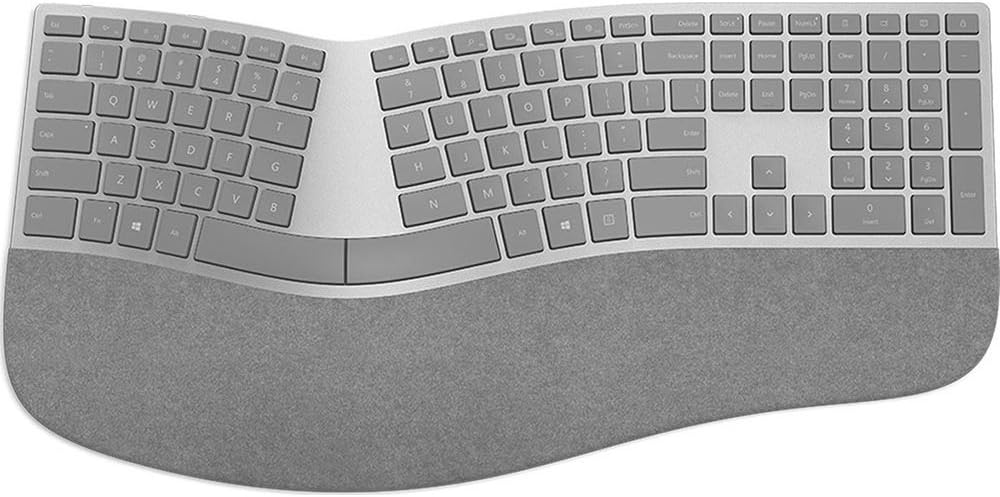
Quick Verdict: The Surface Ergonomic Keyboard is the premium-design option in this group, with a natural arc, a slope and a double-cushioned palm rest covered in Alcantara. It is also the most expensive and, based on the listing, is aimed squarely at Windows and Surface users.
Best For: Windows and Surface users who value materials and styling alongside a curved, sloped shape.
Key Specifications:
- Connectivity: Bluetooth Low Energy 4.0/4.1, wireless range up to 32 ft
- Compatibility: Windows 10; listing mentions Surface Pro 4, Surface Book and Surface Studio
- Palm rest: double-cushioned, Alcantara-covered
- Size: 18.11 x 9.02 x 1.36 in (about 46.0 x 22.9 x 3.5 cm)
- Weight: 2.23 lb (about 1.01 kg)
- Warranty: 1 year
- Listed price: $249.99 | Rating: 4.2/5 (1,039 reviews)
What We Like:
- Natural arc and slope in a slim profile
- Soft Alcantara palm rest
- Two-battery design with Bluetooth range up to 32 ft
What We Don’t Like:
- The most expensive keyboard in the guide by a wide margin
- Listing is for a first-generation model with older Bluetooth and Windows 10 requirements
- Alcantara can be harder to keep clean than a plastic or foam surface, and the warranty is only 1 year
Ergonomic Analysis: The arc and slope are designed to reduce wrist bending, and the palm rest provides support. Because it is a one-piece curved keyboard rather than a true split, its posture effect is closer to the Wave Keys than the K860.
Who Should Buy It? Surface owners who want a keyboard that matches their setup and are comfortable paying for design and materials.
Who Should Skip It? Mac users, budget buyers, and anyone who wants a true split.
Value for Money: The price is hard to justify on features alone. Check current availability and compatibility with your device before purchasing. If you like the Microsoft style, our Microsoft Sculpt Ergonomic Keyboard review is worth reading as well.
Wireless Ergonomic Keyboard Comparison Table
| Product | Type | Key Ergonomic Feature | Connectivity | Width × Depth | Listed Price | Rating |
|---|---|---|---|---|---|---|
| Logitech Ergo K860 | Curved split, full-size | Palm lift 0/-4/-7° | Bluetooth + USB receiver | 45.6 × 23.3 cm | $149.99 | 4.6/5 |
| Kensington Pro Fit Ergo | Split, sloped | Reverse tilt positions | 2.4GHz + Bluetooth 4.0 LE | 48.2 × 25.2 cm | $52.87 | 3.9/5 |
| X9 Performance Wireless Ergonomic Keyboard | Two-zone split | Wrist cushion, 110 keys | 2.4GHz USB-A receiver | 48.3 × 25.0 cm | $59.99 | 4.0/5 |
| Logitech Wave Keys | Wave, one-piece | Memory-foam palm rest | Bluetooth + Logi Bolt | 37.6 × 21.9 cm | $69.99 | 4.3/5 |
| Nulea Ergonomic Split Keyboard (RT05) | Split, curved | 3 tilt levels, backlight | Bluetooth + 2.4GHz | 41.9 × 24.4 cm | $64.99 | 4.2/5 |
| TECKNET Wireless Ergonomic Keyboard | Split, curved keys | Dual-density foam rest | Bluetooth 5.0 + dongle | Not listed | $35.99 | 4.3/5 |
| Microsoft Surface Ergonomic Keyboard | Curved, one-piece | Double-cushioned palm rest | Bluetooth LE 4.0/4.1 | 46.0 × 22.9 cm | $249.99 | 4.0/5 |
Which Wireless Ergonomic Keyboard Should You Buy?
Choose the Logitech Ergo K860 if: you type for hours, want the best overall balance of support and adjustability, and have the desk space.
Choose the TECKNET if: price is your priority and you want to try a split layout with Bluetooth and 2.4GHz options.
Choose the Nulea if: you switch between devices and want a rechargeable split keyboard with adjustable tilt.
Choose the Logitech Wave Keys if: you have a smaller desk, want a gentler transition, or like Logitech’s multi-device switching.
Choose the Kensington Pro Fit Ergo if: you want a longer warranty and spill resistance in a split layout, and your computer meets the listed system requirements.
Choose the X9 if: you use Windows, want a plug-and-play receiver and do not need Bluetooth.
Choose the Microsoft Surface Ergonomic Keyboard if: you already use Surface devices and care about materials and design.
Common Mistakes When Buying a Wireless Ergonomic Keyboard
- Buying on star rating alone. A 4.4 and a 3.8 can both be right for the right person. Read what the lower reviews complain about.
- Ignoring desk width. A 48 cm keyboard pushes the mouse out, which can lead to shoulder reach. Measure first.
- Assuming “ergonomic” means “comfortable for me”. Hand size, desk height and typing style all change the answer.
- Skipping the compatibility check. Several listings here have operating system details that do not line up. Confirm on the manufacturer’s page.
- Resting your wrists on the palm rest while typing. It is meant for pauses.
- Giving up after two days. Split and curved layouts take time. The NIOSH-hosted study mentioned earlier had participants practise for at least 10 hours before testing.
- Changing only the keyboard. Chair height, desk height and mouse position matter just as much.
- Expecting a keyboard to treat pain. It can change your position, but it is not a medical device.
Best Practices for Using an Ergonomic Keyboard
- Aim for a neutral position. OSHA’s good working positions guidance describes straight, in-line hands, wrists and forearms, relaxed shoulders, and elbows bent between 90 and 120 degrees.
- Adjust keyboard tilt to your chair and desk. OSHA also notes that tilt may need to be raised or lowered to keep wrists straight, and that you should not use keyboard feet if they increase wrist bending.
- Keep your mouse close. Pair your keyboard with a mouse that sits near the body so you are not reaching sideways past a wide palm rest.
- Take movement breaks. OSHA states that sitting still for long periods is not healthy even with good posture.
- Do not rest on the palm rest while typing. Float your hands over the keys.
- Give yourself an adjustment period. Start with shorter sessions if the layout feels strange.
Emily Richardson’s recommendation: If you work from home for several hours a day, prioritise proper fit, adjustability and workspace compatibility before paying extra for features you may not use.
Ergonomic products can improve comfort and workspace positioning, but they are not medical treatments. If you have persistent or severe pain, numbness or tingling, please speak with an appropriate healthcare professional.
Alternatives Worth Considering
- Best alternative if you want a flatter, smaller keyboard: the best compact ergonomic keyboards guide covers TKL and 75 percent layouts that free up mouse space.
- Best alternative if you want a true split: our split keyboard roundup includes designs with a wider separation than the ones here.
- Budget alternative: the TECKNET, if you want to test a split layout before spending more.
- Premium alternative: the Microsoft Surface Ergonomic Keyboard if design and materials are priorities.
- Smaller alternative: the Logitech Wave Keys.
I am not suggesting any of these just to add links. If your current keyboard is not causing problems, you may be fine with better desk and chair adjustment.
Wireless Ergonomic Keyboard FAQs
Are wireless ergonomic keyboards worth it?
They can be worth it if you type for long periods and your current keyboard leaves your wrists bent or your forearms rotated. Good designs may help you hold a more neutral position. They are not a medical treatment, and results depend on desk height, chair setup and how you type.
What is the best wireless ergonomic keyboard?
For most people, the Logitech Ergo K860 offers the best overall balance of curved split design, palm support, tilt adjustment and Bluetooth or USB receiver connectivity. The TECKNET is the lowest-cost split option here, and the Logitech Wave Keys is the more compact choice.
Is Bluetooth or a 2.4GHz receiver better for an ergonomic keyboard?
Bluetooth is convenient because it needs no receiver and works with laptops and tablets. A 2.4GHz receiver is plug-and-play and does not depend on Bluetooth support, but it uses a USB port. Keyboards offering both, such as the K860, Nulea and TECKNET, give you the most flexibility.
How long does it take to get used to a split keyboard?
It varies by person. Some people adjust within a few days, while others take a couple of weeks. In the NIOSH-hosted study mentioned above, participants practised for at least 10 hours before testing. Start with shorter sessions and be patient with the key layout.
Can a wireless ergonomic keyboard help with wrist pain?
It may improve comfort by encouraging a more neutral wrist and forearm position. It cannot treat or cure a medical condition. OSHA notes that available research does not provide conclusive evidence that alternative keyboards prevent discomfort or injury, and a Cochrane review of office-worker trials found the wider evidence unclear. If pain persists, see a healthcare professional.
Do I need a palm rest with an ergonomic keyboard?
Not always. Canada’s CCOHS guidance on wrist rests notes that leaning on a rest too often or too heavily can put pressure on the underside of the wrist, while a soft rest can help if the alternative is a hard desk edge. Use it for pauses, not as an anchor while typing, and skip it if you prefer a lower profile.
Are split keyboards better than wave or curved keyboards?
Split keyboards generally change hand and wrist position more, because the halves can sit closer to shoulder width. Wave or curved keyboards are easier to adapt to and take less space. Which is better depends on how much change you want and how much desk you have.
How long do batteries last on wireless ergonomic keyboards?
It depends on the model and use. Logitech says the Wave Keys can run up to 3 years on the included batteries, and TECKNET lists up to 200 hours of continuous use per charge. Backlighting, if present, shortens life. These are manufacturer figures.
Do wireless ergonomic keyboards work with Mac?
Some do. The Logitech K860 listing mentions macOS, and the Nulea and Kensington listings list macOS support. The X9 and TECKNET listings emphasise Windows, so check the manufacturer’s page before buying if you use a Mac.
Are wireless ergonomic keyboards less reliable than wired ones?
Modern wireless keyboards are generally dependable in everyday use, but they add batteries and a wireless connection that can occasionally drop. If you notice dropouts, try moving the receiver closer or using a USB extension. If you need guaranteed responsiveness, a wired split keyboard may be a better fit.
Final Verdict
If you want the best overall wireless ergonomic keyboard, choose the Logitech Ergo K860. It offers the strongest combination of curved split design, palm support, tilt adjustment and flexible connectivity, with the trade-off being price and size.
If price is your priority, the TECKNET is the cheapest way to try a split layout, as long as you verify the variant details first. If you switch devices, the Nulea is my pick for a split keyboard with multi-device switching and USB-C charging.
For a smaller desk or a gentler change, the Logitech Wave Keys is easier to live with. The Kensington suits buyers who want a long warranty and spill resistance, the X9 suits Windows users who want a simple receiver-based split, and the Microsoft Surface Ergonomic Keyboard is for those who value design and are happy to pay for it.