Best Split Ergonomic Keyboard Picks for Wrist Comfort in 2026

Choosing a Split Keyboard Without Wasting Money
If your wrists feel tired or bent by the end of a long typing day, a straight keyboard may be part of the reason. A split keyboard is the obvious next thing to try, but the choices are confusing. Some boards are one piece, some are truly two pieces, some tent, some do not, and the prices run from about $40 to $150.
I wrote this guide to help you decide two things: whether a split keyboard is worth trying at all, and which one fits your desk, budget and hands. I compare seven keyboards, explain what the research does and does not show, and tell you where each pick falls short.
Most “best split keyboard” lists mix up three different designs: one-piece boards with a split layout, truly two-piece boards, and tented designs. They behave very differently, so I keep them clearly separated here.
If you are still comparing keyboard types in general, our guide to the best ergonomic keyboards for 2026 covers split, compact and wireless options side by side.
A quick note on how we evaluate products: At ErgoFixes, our product evaluations combine manufacturer specifications, verified retailer and Amazon listing data, customer feedback, review patterns, and ergonomic design analysis. We assess products across factors such as comfort, adjustability, materials, functionality, durability, and overall value, using multiple sources to provide a balanced and practical recommendation.
Ergonomic keyboards can improve comfort and positioning, but they are not medical treatments. If you have persistent or severe wrist, hand or arm pain, please speak with a qualified healthcare professional.⌨️ Quick Answer: The Best Split Ergonomic Keyboards at a Glance
Seven split and near-split keyboards, ranked by how well they balance ergonomic design, adjustability, connectivity and price. Prices are Amazon.com listing prices at the time we reviewed them and can change.


What is the best split ergonomic keyboard? For most people, the Logitech Ergo K860 is the best split ergonomic keyboard because it combines a curved split frame, a cushioned wrist rest, negative tilt legs and flexible wireless connectivity. If you want to fine-tune hand separation and tenting, the Kinesis Freestyle2 gives you more control, at the cost of a wired connection.
Are split keyboards worth it? They can be, if you notice your wrists bending outward on a straight keyboard. Research shows a correctly set-up split layout can bring the wrists closer to neutral, but evidence that it prevents pain is still mixed. Many people need several weeks to adjust.
Quick Verdict Table
| Product | Best For | Main Strength | Main Limitation | Rating | Link |
|---|---|---|---|---|---|
| Logitech Ergo K860 | Most people, all-day typing | Curved split, wrist rest, Bluetooth + receiver | Priciest wireless pick; uses AAA batteries | 4.6/5 | 🛒 Check Price |
| Kinesis Freestyle2 (VIP3) | Fine-tuning posture | Two halves, 5/10/15° tenting | Wired only; wide footprint | 4.5/5 | 🛒 Check Price |
| ProtoArc EK01 Plus | Switching between devices | 3-device pairing, backlight, 2000mAh battery | Full-size, uses a lot of desk space | 4.3/5 | 🛒 Check Price |
| Perixx PERIBOARD-512B | Wired value seekers | Split layout, 4.2 mm key travel, 9,600+ ratings | Bulky; confirm layout before buying | 4.3/5 | 🛒 Check Price |
| Arteck HW315 | Budget cordless setups | Slim, rechargeable, 24-month warranty | 2.4G dongle only; Windows-focused | 4.1/5 | 🛒 Check Price |
| DELUX GM909 | Mac and Windows users who like wave keys | Bluetooth 5.2 + 2.4GHz, OS layout switch | Only 35 ratings; heaviest here | 3.9/5 | 🛒 Check Price |
| Kensington Pro Fit Ergo | Easing in before a true split | Wrist rest, reverse tilt, spill-resistant build | One-piece layout, not a split keyboard | 3.8/5 | 🛒 Check Price |
What the Research Says About Split Keyboards and Wrist Comfort
Before spending money, it helps to know what a split layout can and cannot do.
Claim: A split layout can reduce ulnar deviation, which is the wrist bending toward the little-finger side.
Evidence: A Human Factors study of 90 experienced office workers found that correctly set-up split keyboards reduced mean ulnar deviation of both wrists from about 12° to within 5° of neutral, compared with a conventional keyboard.
Simple explanation: On a straight keyboard, your hands are usually placed closer together than your forearms naturally sit, so the wrists tend to angle outward. Splitting the keys lets each hand line up more naturally with its forearm.
Practical example: If you look down at your hands and see the wrists kinking toward the little fingers, a split layout targets exactly that.
What this means: The research supports the posture mechanism. It does not prove that any specific keyboard in this guide will reduce your pain.
Claim: Opening angle and keyboard height matter as much as the split itself.
Evidence: In a CDC-hosted study by David Rempel and colleagues, 24 touch typists used seven keyboard configurations. A mid-range opening angle of 15° gave the best balance between less ulnar deviation and no extra forearm pronation, and the lowest keyboard height tested gave the best arm postures. Slope and angle had mixed effects on other joints.
Simple explanation: Opening the halves too far can twist your forearms. Raising the keyboard can lift your shoulders.
Practical example: If you prefer to pick the most adjustable board, start near the middle of its range and keep it low, rather than maxing out every setting.
What this means: More adjustment is useful only if you set it sensibly.
Claim: Better wrist posture in the lab has not reliably translated into less pain at work.
Evidence: A review of alternative keyboards by Nancy Baker at the University of Pittsburgh, hosted by the CDC, concluded that the literature strongly supports their ability to reduce risky postures but is much more equivocal about reducing symptoms in the workplace. In the author’s own crossover trial of 77 symptomatic computer operators, a fixed split-angle keyboard was no more effective than a standard flat keyboard. An exploratory analysis hinted at a larger benefit for people with moderate to severe symptoms, but the author says those results should be interpreted with caution. OSHA’s keyboard guidance says something similar: alternative keyboards help maintain neutral wrist postures, but available research does not provide conclusive evidence that they prevent discomfort or injury. The wider Cochrane review of ergonomic interventions for office workers also describes the evidence as unclear.
Simple explanation: Posture is one risk factor among several. Workload, breaks and individual differences also matter, and many lab sessions last only minutes.
Practical example: Treat a split keyboard as one adjustment alongside desk height, mouse position and regular breaks, rather than a stand-alone fix.
What this means: The evidence is stronger for posture than for pain prevention, and none of these studies tested the specific products in this guide.
Our honest summary is this: split keyboards have good evidence for improving wrist posture, and weaker evidence for preventing pain. For a deeper look, read does an ergonomic keyboard fix wrist pain.
How to Choose a Split Ergonomic Keyboard: 7 Buying Factors
1. One-Piece Split vs Truly Two-Piece
Most keyboards sold as “split” are one-piece boards with the keys divided into left and right zones. The Logitech K860, ProtoArc EK01 Plus, Perixx PERIBOARD-512B, Arteck HW315 and DELUX GM909 fall into this group.
A truly two-piece board has separate halves you can move. In this guide, only the Kinesis Freestyle2 does that, with up to 9″ of separation using its tether, according to the Amazon listing. If you searched for the best two-piece keyboard in 2026, that distinction is the first decision to make.
2. Opening Angle and Tenting
Opening angle controls how far each half rotates away from the centre. Tenting raises the inner edges so your palms tilt toward each other, which may reduce forearm pronation.
Fixed boards give you one setting. Adjustable boards let you tune it. If you want to go deeper on tenting, see our guide to the best tented ergonomic keyboards.
3. Slope and Wrist Support
Look for a flat or negative slope. OSHA’s workstation guidance notes that steep tilt or extended keyboard feet may bend the wrist upward, and says not to use keyboard feet if they increase wrist bending.
In the same CDC-hosted split-keyboard study, slopes between 0° and -4° gave the least wrist extension, forearm pronation and elbow height of the slopes tested. That range matches the Logitech K860’s 0° and -4° legs. Its -7° leg goes beyond what that study tested, so I would try the milder settings first.
A wrist or palm rest is useful for resting between bursts of typing. It should not become a place to park your wrists while you type.
4. Layout and Learning Curve
A split layout changes where your hands sit, but the key order stays the same. That makes it easier to learn than a column-staggered or ortholinear board. Perixx’s listing says most users adapt within one to two weeks, but independent research suggests it can take longer: the Baker review cites a study in which users needed four to six weeks, and many participants in its own trial said a month or more.
Full-size boards also include a numeric keypad, which pushes your mouse further to the right. If you do not use the numpad, a compact board may suit you better.
5. Switch Feel and Key Travel
Membrane, scissor and mechanical-style switches feel different. The Perixx has 4.2 mm of key travel and audible tactile feedback. Scissor-switch boards such as the Arteck HW315 and DELUX GM909 are lower profile.
Research Insight: In a laboratory study of 20 typists at Oregon State University, ultra-low-travel keyboards (0.5 to 1.6 mm) produced slightly lower typing force than a 2.0 mm keyboard, but the differences were small: median force differed by under 0.1 N and finger muscle activity by under 2% of maximum. The shortest-travel keyboards were the least preferred. Sessions were only 10 minutes per keyboard, with healthy typists.
What this means: Within this range, key travel looks like a question of feel and preference rather than a proven health factor. I could only verify key travel for the Perixx (4.2 mm), so treat switch feel as personal and check the return policy.
6. Connectivity, Battery and Compatibility
Wired boards never run out of power. Wireless boards free up your desk. If you are weighing cordless options, our list of the best wireless ergonomic keyboards goes deeper.
Always check operating-system compatibility. Some listings in this guide emphasise Windows only, while others list macOS, Linux or ChromeOS.
7. Desk Space, Hand Size and Budget
Full-size split boards are wide. Measure your desk before buying, and check that your mouse still sits close to your body.
Emily Richardson’s tip: If you work from a small home office, choose the keyboard footprint first and the feature list second. A feature you cannot position properly will not help you.
Split Keyboards for Programmers: What to Know
If you write code all day, you are probably using symbol keys, shortcuts and modifier combinations constantly. That makes comfort and key access more important than raw speed.
Here is what I would check as a programmer:
- Modifier access: Make sure Ctrl, Alt and Shift are easy to reach with a neutral wrist.
- Numpad and mouse reach: A full-size layout pushes the mouse away. Keep that in mind if you switch between keyboard and mouse a lot.
- Remapping: The listings for these seven boards do not describe firmware-level programming. Logitech mentions customising Fn keys through its Options software, and the Kinesis listing says no software is needed. If you want full key remapping, you will need to look at specialist programmable boards.
- Learning curve: These seven boards keep a familiar layout, so you can switch without relearning your muscle memory.
For most coders who want a gentle first step, the Logitech K860 or Kinesis Freestyle2 is where I would begin.
Best Split Ergonomic Keyboards
1. Logitech Ergo K860: Best Overall
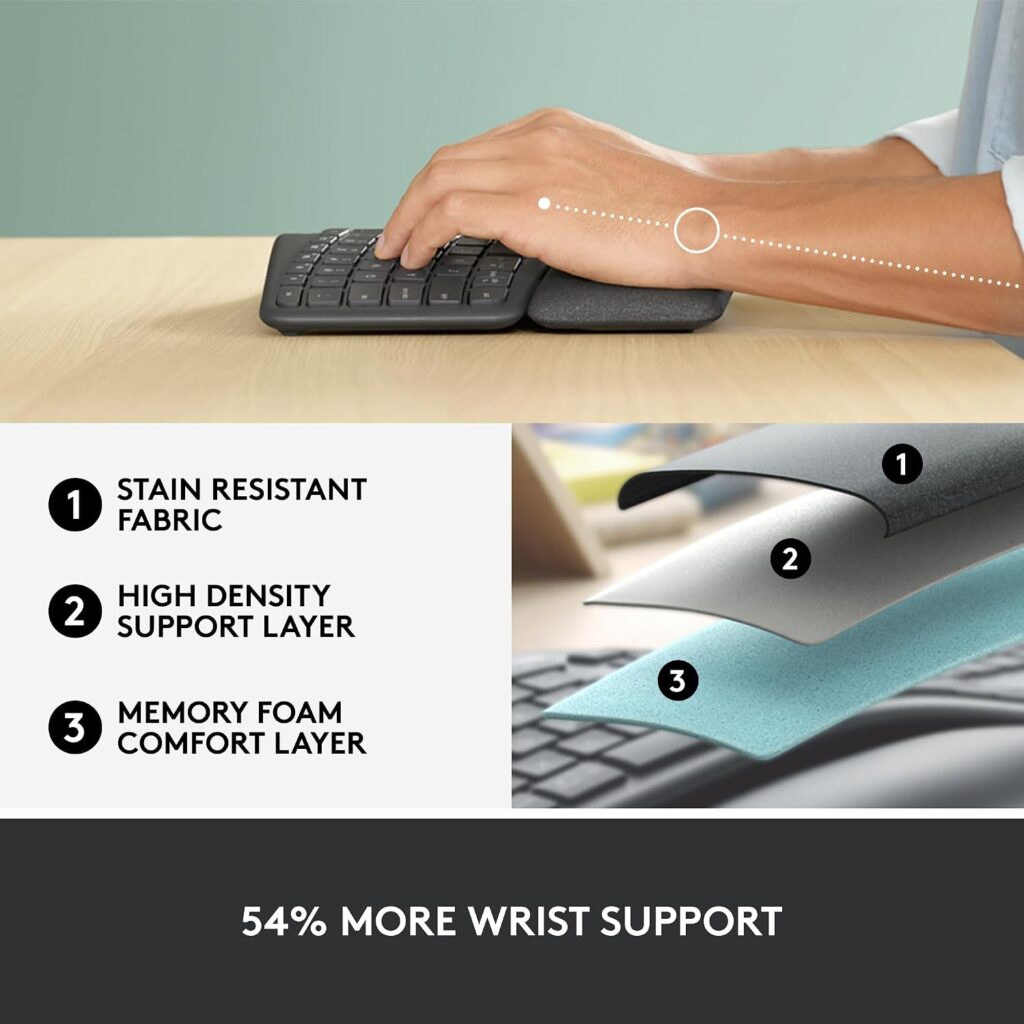
Quick Verdict: The K860 is the most complete package in this guide. It combines a curved split frame, a memory-foam wrist rest, Bluetooth plus a USB receiver, and support for several operating systems. It costs more than most rivals, but it is the one I would recommend first.
Best For: Office workers, remote workers and writers who type for long periods and want a wireless split keyboard with minimal fuss.
Key Specifications:
- Price: $149.99 on the Amazon.com listing
- Dimensions: 17.95″ L x 9.17″ W x 1.89″ H; weight 2.56 lb
- Connectivity: Bluetooth or USB receiver; two AAA batteries included
- Tilt legs: 0°, -4° and -7° (negative tilt)
- Compatibility: Logitech lists Windows, macOS, Linux and ChromeOS
- Amazon rating at review time: 4.4/5 from 8,071 ratings
What We Like
- Curved, split frame with scooped keys
- Pillowed wrist rest; Logitech claims 54% more wrist support and 25% less wrist bending than a standard keyboard without a palm rest
- Negative tilt options that avoid raising the front of your wrists
- Works across several operating systems and offers Fn-key customisation through Logitech Options
What We Don’t Like
- The most expensive wireless pick here
- Uses disposable AAA batteries instead of a built-in rechargeable cell
- Fixed split angle with no separation or tenting adjustment
Ergonomic Analysis: The K860 uses a fixed split with a gentle curve, so each hand sits closer to the angle of its forearm. The negative tilt option is a thoughtful feature, because many keyboards tilt the wrong way for neutral wrists. The 54% and 25% figures are manufacturer claims, and they compare against a keyboard without a palm rest.
Who Should Buy It? Anyone who wants a single reliable keyboard that works on a Mac, Windows PC or tablet, without a steep learning curve.
Who Should Skip It? Anyone who wants adjustable splay or tenting, or who is on a tight budget.
Value for Money: It is priced as a premium option. If you type for hours every day, the feature set can justify it. If you only type occasionally, the Perixx or Arteck costs far less.
🛒 Check Price on Amazon2. Kinesis Freestyle2 (VIP3): Most Adjustable
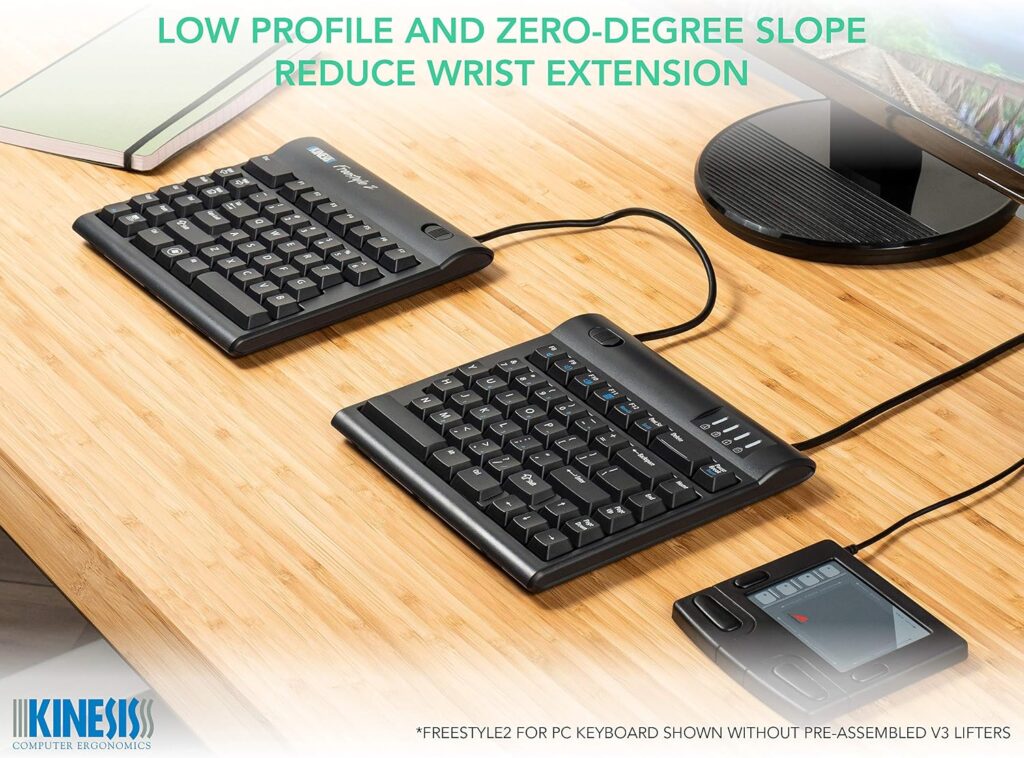
Quick Verdict: The Freestyle2 is the board for people who want control. You can separate the halves, rotate them, and tent them at 5°, 10° or 15°. It is also the answer if you specifically need a true two-piece keyboard.
Best For: Users who want to tailor wrist, forearm and shoulder positions, and who do not need wireless.
Key Specifications:
- Price: $144.00 on the Amazon.com listing (PC layout; a Mac version is listed separately)
- Separation: up to 9″ using the listing’s detachable pivot tether
- Tenting: VIP3 lifters pre-installed for 5, 10 and 15 degrees, with cushioned palm supports
- Switches: low-force membrane; 94 keys with an embedded numeric keypad
- Connection: wired USB-A; no software or special drivers required
- Dimensions: 19″ L x 12.5″ W x 3.5″ H; weight 2 lb
- Amazon rating at review time: 4.3/5 from 613 ratings
What We Like
- Two separate halves, so you can match your shoulder width
- Three tenting heights for forearm positioning
- Low-force keys and a familiar layout
- Plug and play, no software
What We Don’t Like
- Wired USB-A only
- Takes more desk space when opened out
- Membrane switches can feel softer than some mechanical boards, depending on preference
Ergonomic Analysis: Because the halves can rotate and separate, you can find a hand position that suits your shoulder width. Tenting may reduce forearm pronation. Rempel’s team found that angle and height both matter. An earlier Marquette University study of 11 experienced typists found that three different split setups all produced less ulnar deviation than a conventional layout, with no differences among them. In plain terms, you probably do not need to push the separation to its maximum. I recommend starting with moderate settings and changing one at a time.
Who Should Buy It? People who want to experiment with separation and tenting, or who share a desk and want a configurable board.
Who Should Skip It? People who want a cordless setup, or who prefer a ready-to-go design with no setup choices.
Value for Money: At $144 it costs about the same as the K860, but you are paying for adjustability instead of wireless freedom.
Emily Richardson’s tip: When you first set up an adjustable split keyboard, make small changes over several days rather than maxing out the angle in one go. A big jump in layout can make typing feel awkward and discourage you.
🛒 Check Price on Amazon3. ProtoArc EK01 Plus: Best Multi-Device Wireless
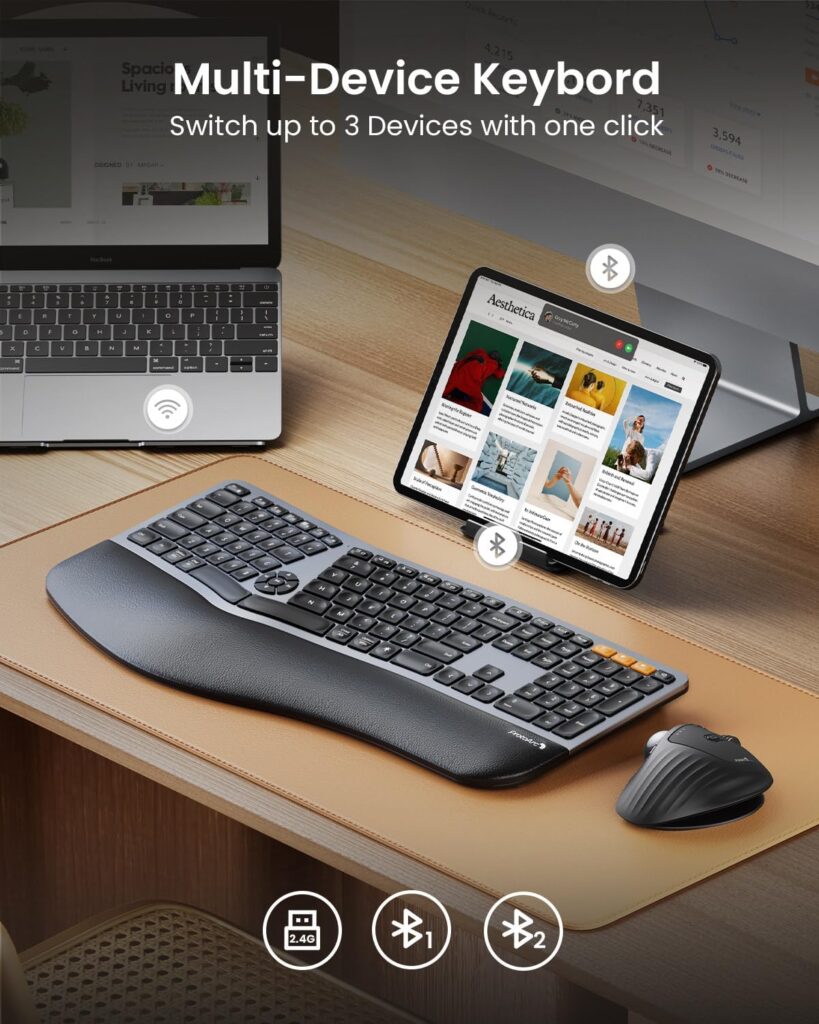
Quick Verdict: The EK01 Plus gives you more features per dollar than any other wireless pick here. It has a curved split frame, a cushioned wrist rest, a backlight and three-device pairing. The trade-off is size.
Best For: People who move between a laptop, tablet and desktop and want a wireless split keyboard that is rechargeable.
Key Specifications:
- Price: $74.99 for the grey model on the Amazon.com listing; other colours cost more
- Connectivity: Bluetooth or 2.4G USB, pairs with up to three devices
- Battery: 2000mAh rechargeable via USB-C. The listing states about 12–13 hours with the backlight on high, and 90–100 days with it off
- Tilt: four adjustable tilt feet with three angles
- Keys: 117 keys; scissor-type switches
- Compatibility: Windows 8/10 or above, macOS 10.12 or above, Android 4.3 or above
- Amazon rating at review time: 4.3/5 from 1,111 ratings
What We Like
- Three-device switching
- Backlight with three brightness levels
- Large battery and USB-C charging
- Cushioned wrist rest
What We Don’t Like
- Full-size layout takes up considerable desk space, which the listing itself points out
- Cannot be used with a cable, so you cannot type while it charges
- Backlight shortens battery life significantly
- The listing’s spec table says “Mechanical” but names the switch a “ProtoArc Scissor Switch”, so check the current description
Ergonomic Analysis: The curved split frame and wrist rest follow the same logic as the K860. One caution: raising the tilt feet increases the angle at which the wrist extends. OSHA recommends avoiding keyboard feet if they increase wrist bending, so I would keep the legs flat unless your chair and desk height force you to do otherwise.
Who Should Buy It? Multi-device users who want a feature-rich wireless split keyboard for well under $100.
Who Should Skip It? Anyone with a small desk, or anyone who wants a wired fallback.
Value for Money: Strong. It undercuts the K860 by $75 while offering a backlight and multi-device pairing.
🛒 Check Price on Amazon4. Perixx PERIBOARD-512B: Best Value (Wired)
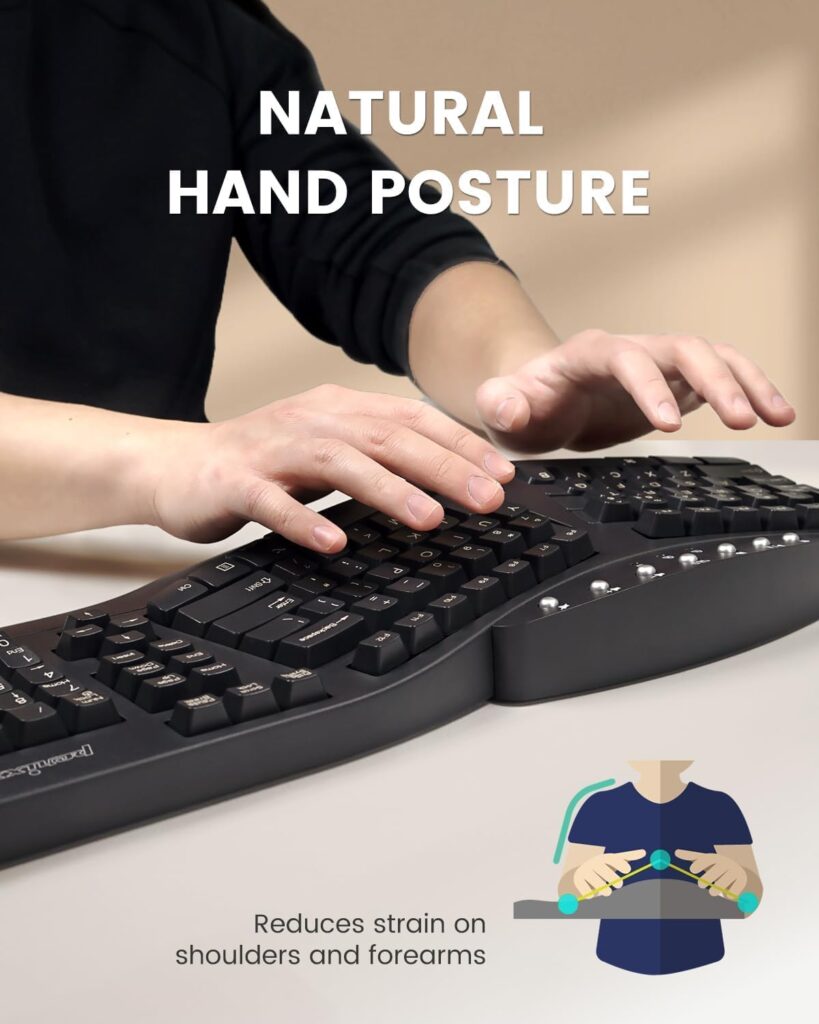
Quick Verdict: The PERIBOARD-512B has been a popular wired split design for years. It is simple, sturdy and inexpensive. It is also bulky, and the listing has a spec inconsistency you should check.
Best For: People who want a proven, low-cost split layout and do not need wireless.
Key Specifications:
- Price: $49.99 on the Amazon.com listing
- Layout: one-piece split with a stepped, curved key layout; wrist rest included per the listing title
- Switches: membrane with 4.2 mm key travel and tactile feedback; rated by Perixx at up to 20 million keystrokes
- Dimensions: 19.09″ L x 9.29″ W x 1.73″ H; weight 2.28 lb
- Connection: wired USB; Windows listed
- Warranty: 12 months limited
- Amazon rating at review time: 4.4/5 from 9,617 ratings
What We Like
- The largest review base in this guide
- Long key travel and tactile feedback
- Low price for a split layout
- Perixx says most users adjust within one to two weeks (independent research suggests some take longer)
What We Don’t Like
- Bulky body, with the listing itself describing the size as bulky
- Wired only
- Audible feedback may be noticeable in shared spaces
- The product title says “US English” but the spec table lists AZERTY, so confirm the key layout before buying
Ergonomic Analysis: It uses a fixed split with curved rows, which suits users who want a straightforward posture change without any configuration. Because the angle cannot be altered, it will fit some hand sizes better than others.
Who Should Buy It? Budget-minded users who want a split layout today.
Who Should Skip It? Shared offices that need quiet keys, or anyone who wants wireless or tenting.
Value for Money: Excellent. It is the cheapest true split-layout board in the guide, backed by a very large review base.
🛒 Check Price on Amazon5. Arteck HW315: Best Budget Wireless

Quick Verdict: The Arteck HW315 is a slim, rechargeable and affordable wireless split board. It leaves out Bluetooth, which limits who it suits, but it is a neat solution for a single desktop or laptop.
Best For: Windows users who want a low-cost, cordless split keyboard.
Key Specifications:
- Price: $54.99 on the Amazon.com listing, with a coupon price of $46.99 shown at the time
- Connectivity: 2.4G USB nano receiver, stored at the back of the keyboard
- Battery: rechargeable lithium; the listing states up to 6 months based on 2 hours of use per day
- Switches: scissor-switch; 102 keys
- Dimensions: 16.5″ L x 9.6″ W x 1.02″ H; weight 2.62 lb
- Compatibility: Windows 10 and above listed
- Warranty: 24 months per the package contents
- Amazon rating at review time: 4.3/5 from 1,706 ratings
What We Like
- Low-profile body (about 1″ tall)
- Rechargeable battery with USB-C
- Cushioned palm rest
- Longer warranty than several rivals
What We Don’t Like
- No Bluetooth listed, so it occupies a USB port
- The listing focuses on Windows compatibility
- Fixed split with no tilt or tenting options
Ergonomic Analysis: The low profile means your wrists are not lifted high above the desk. Pair it with a desk and chair height that keep your forearms roughly parallel to the floor, as OSHA’s good working positions guidance suggests.
Who Should Buy It? People who want a cordless split keyboard under $60.
Who Should Skip It? Mac users, tablet users, and anyone who needs to switch devices.
Value for Money: Good. The warranty and battery life are strong for the price.
🛒 Check Price on Amazon6. DELUX GM909: Wave-Key Alternative
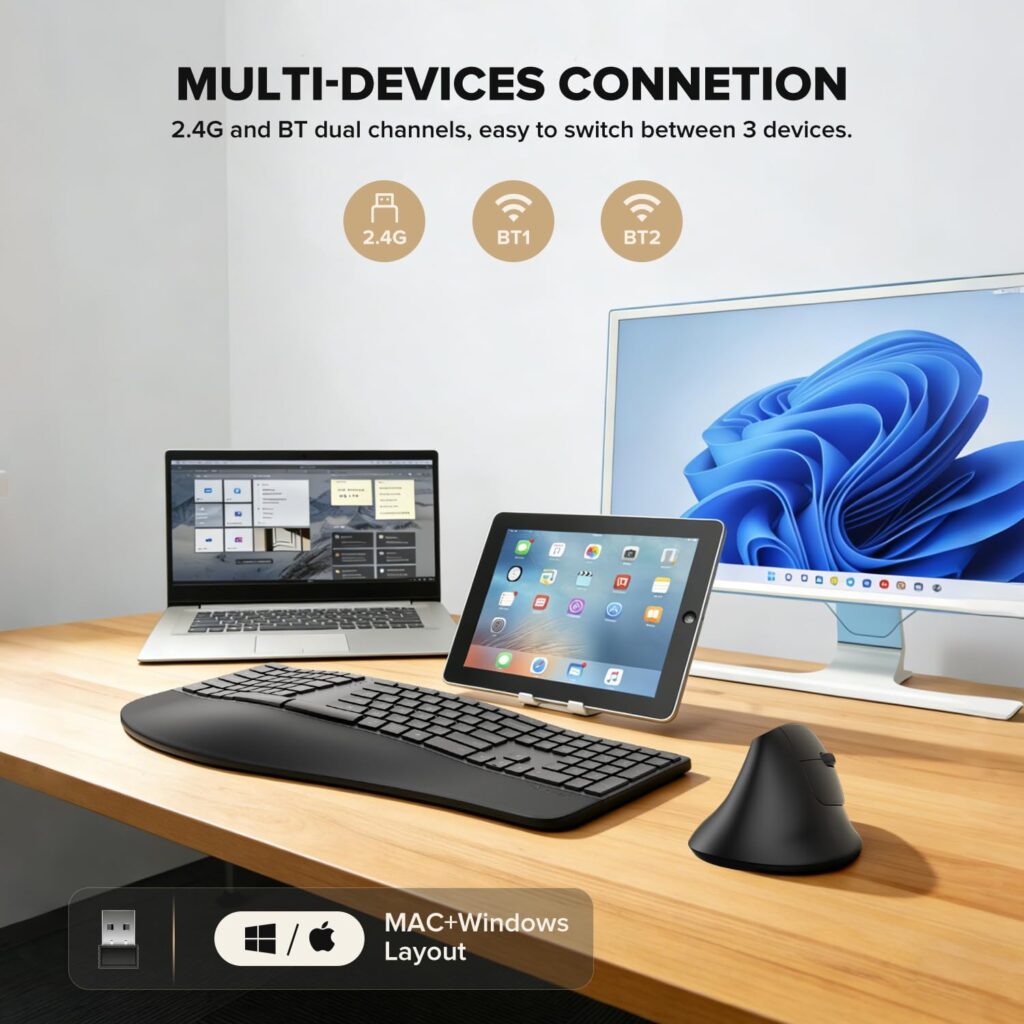
Quick Verdict: The GM909 is a newer entry with Bluetooth 5.2, 2.4GHz and a Mac/Windows layout switch. It is an appealing feature list, but with only 35 ratings it has less proof of long-term reliability than the others.
Best For: Users who want a wave-shaped key layout and a Mac/Windows switch.
Key Specifications:
- Price: $79.99 on the Amazon.com listing
- Connectivity: Bluetooth 5.2 and 2.4GHz, pairs with three devices
- Battery: built-in 500mAh, USB-C; the listing states up to 2–3 months of daily use
- Switches: scissor; 112 keys with numpad and 12 multimedia hotkeys
- Weight: 3.29 lb
- Warranty: 12 months
- Amazon rating at review time: 4.1/5 from 35 ratings
What We Like
- Dual-mode wireless with three-device pairing
- Mac and Windows layout switching
- Cushioned wrist rest
What We Don’t Like
- Very small review base
- The heaviest keyboard in this guide
- The listing’s spec table is inconsistent about connectivity and operating systems, so verify details before purchase
Ergonomic Analysis: The wave-key layout follows a split design, and the wrist rest helps support the hand. Because it is full-size with a numpad, the mouse will sit further right.
Who Should Buy It? Users comfortable with a newer product who want the Mac/Windows switch.
Who Should Skip It? Buyers who prefer products with a long track record.
Value for Money: Fair. It costs about $5 more than the ProtoArc but has far fewer reviews.
🛒 Check Price on Amazon7. Kensington Pro Fit Ergo: Best Non-Split Starter
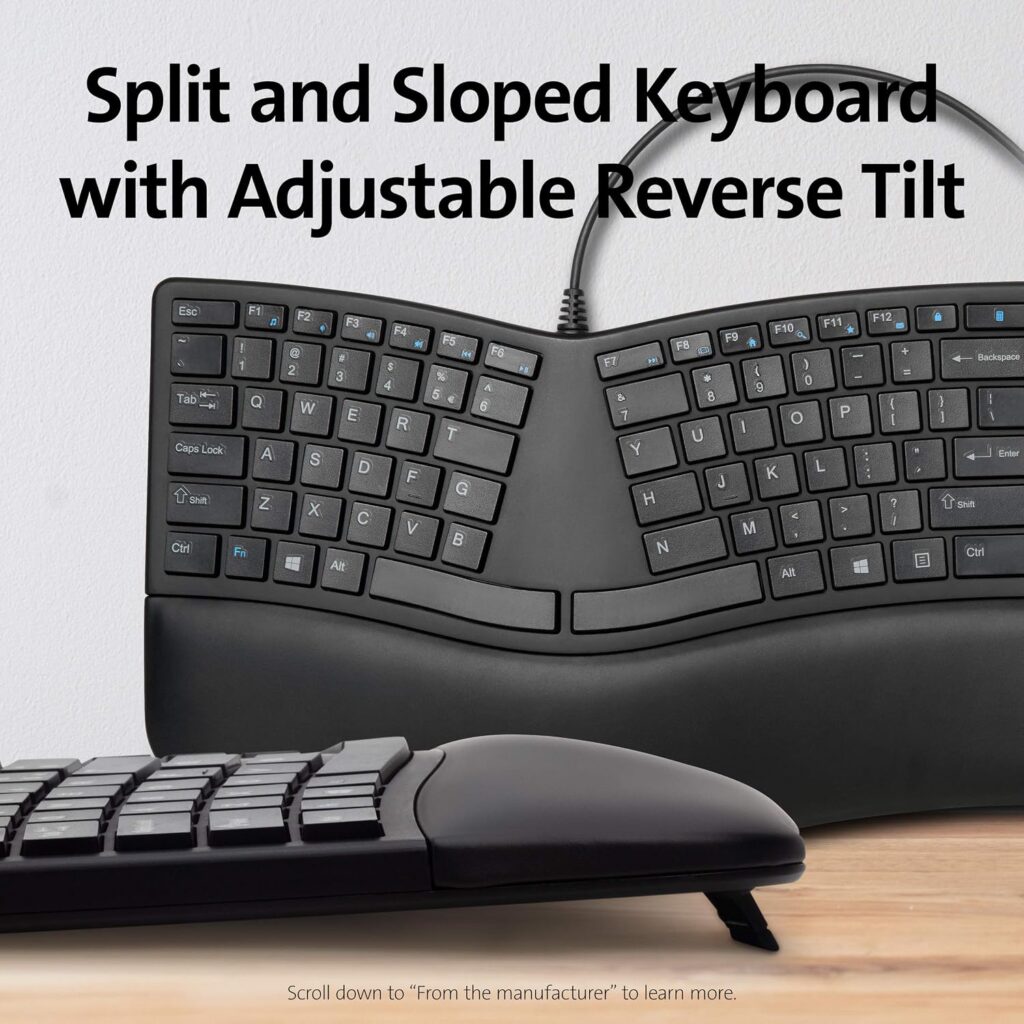
Quick Verdict: The Kensington Pro Fit Ergo is not a split keyboard. I include it because many readers are not sure they are ready for a split layout, and this offers a cushioned wrist rest, reverse tilt and a spill-resistant build at a low price.
Best For: First-time ergonomic buyers and shared desks.
Key Specifications:
- Price: $39.99 on the Amazon.com listing
- Layout: one-piece, single section; 104 keys
- Features: built-in wrist rest, adjustable reverse tilt, quiet keys, spill-proof build tested to MIL-STD-810H Method 504.3
- Connection: wired USB; Windows, macOS and ChromeOS listed
- Weight: 2.2 lb; warranty 3 years
- Amazon rating at review time: 4.1/5 from 833 ratings
What We Like
- Lowest price in this guide
- Three-year warranty
- Quiet keys and wipe-clean construction
What We Don’t Like
- No split layout, so it will not reduce ulnar deviation the way a split design can
- Wired only
- The listing’s dimensions appear transposed, so check the size against your desk
Ergonomic Analysis: Reverse tilt and wrist support can help you avoid an upward-bent wrist. It does not change how far apart your hands sit.
Who Should Buy It? People wanting a modest upgrade from a flat keyboard.
Who Should Skip It? Anyone specifically looking for a split design.
Value for Money: Very good as a starter, but not a substitute for a split layout.
🛒 Check Price on AmazonSplit Keyboard Wrist Pain: What Can and Cannot Be Expected
People often search “split keyboard wrist pain” hoping for a fix. A split layout may help you type with straighter wrists, which can make long sessions feel more comfortable. It will not treat a medical condition.
The Baker review described earlier offered tentative support for alternative keyboards among workers with more severe symptoms, but did not support them as a preventive measure or for mild symptoms.
If your pain is persistent, wakes you at night or comes with numbness or tingling, please talk to a healthcare professional rather than relying on equipment alone. For more detail, see our guide to the best ergonomic keyboard for wrist pain.
Comparison Table
| Product | Type | Key Ergonomic Feature | Weight | Connectivity | Rating |
|---|---|---|---|---|---|
| Logitech Ergo K860 | One-piece curved split | Negative tilt legs, memory-foam wrist rest | 2.56 lb | Bluetooth + USB receiver | 4.6/5 |
| Kinesis Freestyle2 (VIP3) | Two-piece | Up to 9″ separation, 5/10/15° tenting | 2 lb | Wired USB-A | 4.5/5 |
| ProtoArc EK01 Plus | One-piece curved split | Wrist rest, three tilt angles | Not listed | Bluetooth + 2.4G, 3 devices | 4.3/5 |
| Perixx PERIBOARD-512B | One-piece split | Curved rows, 4.2 mm key travel | 2.28 lb | Wired USB | 4.3/5 |
| Arteck HW315 | One-piece split | Low profile (~1″), cushioned palm rest | 2.62 lb | 2.4G USB receiver | 4.1/5 |
| DELUX GM909 | One-piece wave layout | Wave keys, cushioned wrist rest | 3.29 lb | Bluetooth 5.2 + 2.4GHz | 3.9/5 |
| Kensington Pro Fit Ergo | Non-split | Built-in wrist rest, reverse tilt | 2.2 lb | Wired USB | 3.8/5 |
Which Split Keyboard Should You Buy? A Decision Framework
Choose the Logitech Ergo K860 if: you want the best overall balance of comfort, wireless flexibility and OS support.
Choose the Kinesis Freestyle2 if: you want a true two-piece keyboard with adjustable separation and tenting, and a cable is fine.
Choose the ProtoArc EK01 Plus if: you switch between devices and want a backlit, rechargeable board for less than $80.
Choose the Perixx PERIBOARD-512B if: you want the cheapest proven split layout and do not mind a wire.
Choose the Arteck HW315 if: you use Windows, want a cordless board under $60 and have a free USB port.
Choose the DELUX GM909 if: you like the wave-key shape and want a Mac/Windows switch, and you are happy with a newer product.
Choose the Kensington Pro Fit Ergo if: you are not ready for a split layout and want a low-risk step first.
Emily Richardson’s tip: If you are unsure, start with a fixed split board and live with it for a month. If you still want more control after that, move up to an adjustable design.
Common Mistakes When Buying a Split Keyboard
- Assuming every “split” keyboard is two-piece. Most are one-piece designs with a split layout.
- Maxing out the angle on day one. Mid-range settings tend to work better, as the Rempel study suggests.
- Ignoring desk space. Full-size split boards are wide, and a wide board pushes your mouse away.
- Using the tilt feet by default. Extended feet may bend your wrist upward.
- Buying on star ratings alone. A 4.1-star product with 35 reviews and a 4.4-star product with 9,000 reviews do not carry the same confidence.
- Skipping the compatibility check. Some listings emphasise Windows only.
- Expecting the keyboard to fix everything. Chair height, desk height, mouse position and breaks matter as well.
Best Practices for Using a Split Keyboard
- Give it time. Some people need several weeks to adjust, so avoid judging it after one day.
- Keep wrists straight. Aim for hands, wrists and forearms in line and roughly parallel to the floor, as OSHA’s neutral-posture guidance describes.
- Set elbows between 90° and 120°. Adjust your chair or desk to achieve this.
- Keep the keyboard low. Raising it can lift your shoulders.
- Use the wrist rest for pauses. Float your hands while typing.
- Keep the mouse close. A numpad pushes the mouse away; consider a compact layout if you rarely use it.
- Take movement breaks. OSHA notes that sitting still for long periods is not healthy, even with good posture.
Alternatives to Consider
- Tented designs: If forearm rotation is your main concern, see our best tented ergonomic keyboards.
- Wireless-first options: If cordless is your priority, compare the best wireless ergonomic keyboards.
- Programmable column-staggered boards: If you want full key remapping, specialist programmable split keyboards are a different category that we do not cover in this guide. Check each maker’s current specifications.
- Compact layouts: If you rarely use a numpad, a compact board can keep your mouse nearer to your body.
Frequently Asked Questions
What is the best split ergonomic keyboard?
The Logitech Ergo K860 is the best split ergonomic keyboard for most people. It combines a curved split frame, a cushioned wrist rest, negative tilt legs and Bluetooth plus USB receiver connectivity. If you want adjustable separation and tenting, the Kinesis Freestyle2 is the better choice, although it is wired.
Are split keyboards worth it?
They can be worth it if a straight keyboard makes your wrists bend outward. Research shows that correctly set-up split keyboards can bring wrists closer to neutral. Evidence that they prevent pain is weaker, so treat them as a comfort and posture tool, not a medical treatment.
Do split keyboards help with wrist pain?
A split keyboard may help you type with straighter wrists, which can feel more comfortable. It is not a treatment for any condition. OSHA says research does not provide conclusive evidence that alternative keyboards prevent discomfort or injury, and a review of workplace trials found only marginal support overall. See a healthcare professional if your pain is persistent.
How long does it take to get used to a split keyboard?
It varies. The Perixx listing says one to two weeks, but a CDC-hosted review reports that some users took four to six weeks, and many participants in one trial said a month or more. Typing speed may dip at first. Keep a consistent routine and avoid switching back and forth in the early days.
What is the best two-piece keyboard in 2026?
In this guide, the Kinesis Freestyle2 is the only truly two-piece option, with up to 9″ of separation according to its Amazon listing. The other boards are one-piece designs with a split layout. If you want separate halves, the Freestyle2 is the pick.
Are split keyboards good for programmers?
Yes, they can be, because coders type for long sessions. The boards in this guide keep a familiar layout, so they are easy to adopt. If you need firmware-level remapping, you would need to look at specialist programmable keyboards, because the listings here do not describe that.
Is a wireless split keyboard as good as a wired one?
For ergonomics, the layout matters more than the connection. Wireless gives you desk freedom and easier positioning. Wired boards never need charging. Choose based on your workflow, and check the battery details on the current listing.
Should I use the tilt legs on a split keyboard?
Often not. OSHA notes that extended keyboard feet can bend the wrist upward and says not to use them if they increase wrist bending. Many users do better with a flat or negative slope. Adjust your chair and desk height first.
What opening angle is best for a split keyboard?
There is no single best angle. In one CDC-hosted study, a mid-range opening angle of about 15° gave the best balance between less ulnar deviation and no extra forearm pronation. Start moderate and adjust slowly, because hand and shoulder dimensions vary.
Is the Kensington Pro Fit Ergo a split keyboard?
No. The Amazon listing shows a single section, with a built-in wrist rest and reverse tilt. It is a reasonable step up from a flat keyboard, but it will not give you the posture changes of a true split layout.
Final Verdict
If you want one recommendation, buy the Logitech Ergo K860. It offers the best balance of ergonomic design, wireless flexibility and compatibility.
If you want control over your posture, choose the Kinesis Freestyle2. It is the only true two-piece board here.
If price is the priority, the Perixx PERIBOARD-512B (wired) or Arteck HW315 (wireless) give you a split layout for about $50–$55. If you juggle several devices, the ProtoArc EK01 Plus is the better value.
Skip any of these if you have persistent pain and expect a keyboard to solve it. Equipment helps, but your workstation setup and a healthcare professional matter more.