Best Premium Ergonomic Chair 2026: Herman Miller Aeron vs Steelcase Gesture
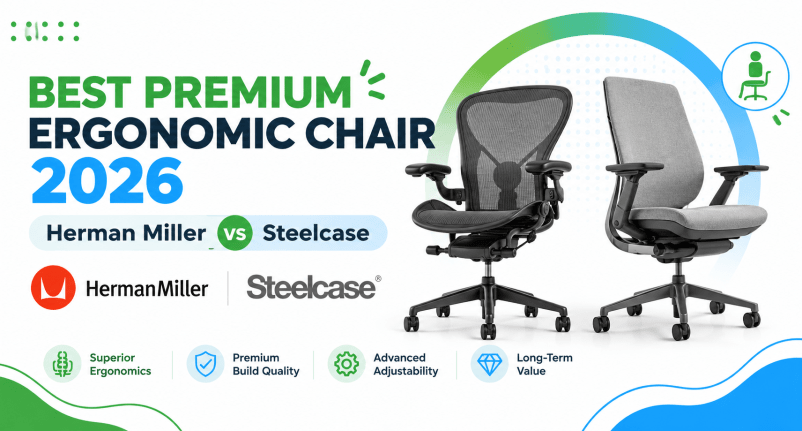
If you have narrowed your search down to these two chairs, you are probably past the stage of wondering whether a premium chair is worth it. You already know it is. What is harder to work out is which of these two very different designs actually fits your body, your desk setup, and the way you work.
Both the Herman Miller Aeron and the Steelcase Gesture sit at the top of the ergonomic office chair market, and both show up constantly in “best premium ergonomic chair” comparisons for good reason. But they solve the sitting problem in genuinely different ways — one leans on a breathable suspension mesh with almost no padding, the other on a flexing backrest paired with an armrest system built around modern multi-device work. This guide walks through both in detail so you can decide with confidence instead of guessing.
🪑 Herman Miller Aeron vs Steelcase Gesture — Quick Answer
Short on time? Here is the quick answer. Full reviews and a detailed comparison follow below.
James Carter’s take: Neither chair is objectively “better” in the way marketing copy often implies. The Aeron tends to suit people who overheat in a padded seat or who want the simplest possible mechanism to think about. The Gesture tends to suit people who work across a laptop, external monitor, and phone throughout the day and want the armrests to follow their arms rather than the other way around.
Quick Verdict Table
| Chair | Best For | Main Strength | Main Limitation | Get It |
|---|---|---|---|---|
| Herman Miller Aeron | Warm rooms, minimalist mechanism, longevity | 8Z Pellicle mesh airflow + PostureFit SL | No back-height adjustment; mesh-only feel | Check Price → |
| Steelcase Gesture | Multi-device workers, wide arm-position range | 360° armrests + LiveBack flexing support | Backrest doesn’t lock fully upright | Check Price → |
Why Trust This Guide
This guide was researched and written by James Carter, an ergonomics and workplace product specialist with more than 12 years of experience evaluating office chairs, ergonomic accessories, and home-office equipment for ErgoFixes. The information below is based on manufacturer specifications, official product documentation, Amazon listing data, and independent third-party reviews rather than a single in-person test session where a claim relies on manufacturer specs versus independent review data, we say so directly. Specifications can vary by chair size, configuration, and region, so always confirm current details on the manufacturer’s page before ordering.
Buying Guide: What Actually Matters in a Premium Ergonomic Chair
Before comparing the Aeron and Gesture side by side, it helps to know what separates a genuinely ergonomic premium chair from an expensive chair that simply looks the part.
1. Lumbar and Back Support Style
Some chairs use a fixed or manually adjustable lumbar pad. Others, like the Gesture, use a backrest that flexes with your movement. Neither approach is automatically superior — a flexing back suits people who shift position often, while a firmer, more static lumbar pad suits people who prefer one locked-in posture.
2. Seat Material: Mesh vs Padded
Mesh seats, like the Aeron’s Pellicle suspension, breathe better and avoid the “hot seat” feeling during long sessions. Padded or foam seats can feel more cushioned initially but retain more heat over an eight-hour day.
3. Armrest Adjustability
Look for height, width, depth, and pivot adjustment (often called 4D arms). More adjustment range means the armrest can actually meet your elbow at a neutral 90-degree angle instead of forcing your shoulders to compensate.
4. Seat Depth Adjustment
Seat depth that can’t be adjusted is a common reason a chair feels wrong for shorter or taller users. Without it, the front edge of the seat either digs into the back of your knees or leaves your lower back unsupported.
5. Weight Capacity and Build Quality
Weight capacity isn’t just about safety margins chairs rated at the top of their capacity range are typically also better in durability terms, since the internal mechanism has to withstand more stress over the same warranty period.
6. Warranty Length
A 12-year warranty, which both chairs in this guide offer, is a strong signal of how long the manufacturer expects the mechanism to last under regular use.
7. Assembly and Delivery
Premium chairs are heavy. Some ship fully assembled; others require partial assembly. This matters more than it sounds if you’re setting the chair up alone.
James Carter’s tip: A product can have excellent ergonomic features on paper but still be uncomfortable if its size, shape, or adjustment range does not match the user. Reading the “who should buy it” and “who should skip it” sections in each review below matters more than the star rating.
Herman Miller Aeron Chair — Full Review

Quick Verdict
The Aeron is arguably the most recognized ergonomic chair ever made, and its 8Z Pellicle mesh remains one of the best-ventilated seating surfaces on the market. It comes in three sizes (A, B, C), so fit depends heavily on ordering the correct one for your height and weight. It is a strong pick for anyone who prioritizes airflow, long-term durability, and a design that has stayed largely unchanged in a good way for decades.
Best For
Users who run warm while sitting, work in a room without strong climate control, prefer a simpler mechanism with fewer moving parts to fiddle with, and who are within the height and weight range of one of the three available sizes.
Key Specifications
- Design: Bill Stumpf and Don Chadwick for Herman Miller; part of MoMA’s permanent collection
- Seat and back material: 8Z Pellicle elastomeric suspension mesh (no foam padding)
- Lumbar support: PostureFit SL (sacral and lumbar)
- Tilt mechanism: Harmonic 2 Tilt with tilt limiter and seat angle adjustment
- Arms: Fully adjustable (height, pivot, and on newer configurations, depth)
- Frame/base: Die-cast aluminum or polymer, graphite or other frame finishes
- Sizes: A (Small), B (Medium), C (Large) height range roughly 4’10” to 6’7″ across sizes
- Weight capacity: Approximately 300–350 lbs depending on size, per manufacturer size charts (some retailer listings cite up to 400 lbs for Size C confirm against the current Herman Miller size guide for your configuration)
- Chair weight: Roughly 40–52 lbs depending on size
- Warranty: 12-year manufacturer warranty
- Country of manufacture: Made in the USA
What We Like
- Genuinely excellent airflow thanks to the all-mesh Pellicle suspension there is no foam layer to compress or retain heat
- PostureFit SL gives real sacral and lumbar support rather than a single generic pad
- Long track record of durability; many original 1990s-era Aerons are still in service
- 12-year warranty backs up the premium price
- Recognizable, museum-collection design that holds resale value better than most office chairs
What We Don’t Like
- No back-height adjustment fit is determined almost entirely by ordering the correct size (A, B, or C)
- Mesh-only construction means no padded or leather option, which some users find less plush on a first sit
- Sizing mistakes are common; buyers who skip the height/weight chart often end up with a chair that doesn’t fit
- Premium pricing puts it well above mid-range ergonomic chairs, and price has moved noticeably in recent years, so always check current pricing rather than relying on older reviews
Ergonomic Analysis
The Aeron’s core idea is that a breathable suspension surface, tensioned across eight zones of varying firmness, can distribute weight more evenly than foam without collapsing over time. James Carter notes that this design tends to reward users who dislike the sinking, “broken-in couch” feeling that foam seats can develop after a few years the Pellicle mesh maintains consistent tension for far longer. The PostureFit SL mechanism is specifically designed to support the sacrum and encourage a slightly forward pelvic tilt, which Herman Miller’s own documentation ties to more open, neutral seated posture. This is a comfort and positioning benefit, not a medical treatment it may help reduce unnecessary strain, but it will not resolve a diagnosed back condition.
Who Should Buy It?
Anyone who has tried mesh chairs before and knows they prefer that surface, anyone in a warm office or home space without reliable air conditioning, and anyone who wants a chair with a long, well-documented service life and doesn’t mind ordering carefully by size.
Who Should Skip It?
Buyers who dislike the firmer, less “cushioned” feel of mesh, anyone who falls between two Aeron sizes and can’t easily test-sit both, and users who specifically want a chair with height-adjustable back support, which the Aeron does not offer.
Value for Money
The Aeron’s price sits at the very top of the office chair market, and that price has fluctuated significantly over the past year, so see current Amazon pricing before assuming an older quoted figure still applies. Whether it’s worth it comes down to how long you expect to keep it. Given the 12-year warranty and a design history that spans multiple decades in continuous service, the effective cost per year of ownership compares favorably to replacing a cheaper chair every three to four years but only if you buy the correct size the first time.
Steelcase Gesture Chair — Full Review

Quick Verdict
The Gesture was built around a study of how people actually move while working across laptops, tablets, and phones, and its defining feature is a 360-degree armrest system that adjusts in more directions than almost anything else on the market. Combined with a flexing LiveBack backrest, it is one of the most adaptable premium chairs available, though that adaptability comes with a couple of trade-offs worth knowing about upfront.
Best For
Users who regularly switch between a keyboard, a tablet, and a phone at their desk, taller users up to roughly 6’4″, and anyone who wants the widest published weight capacity in this comparison.
Key Specifications
- Design concept: Developed by Steelcase after studying more than 2,000 working postures globally, with a focus on multi-device work
- Backrest: LiveBack technology the backrest flexes and reshapes as you move, rather than staying rigid
- Armrests: 360-degree adjustable (height, width, depth, and pivot) the widest arm-width range in this comparison at roughly 10.25″–22.5″
- Seat height: Approximately 16″–21″
- Seat depth: Approximately 15.75″–18.75″
- Back height/width: Approximately 24″ H x 16.25″ W
- Overall height: Approximately 39.25″–44.25″ (varies with optional headrest)
- Weight capacity: 400 lbs, tested for 24/7 use
- Chair weight: Roughly 58 lbs unboxed (heavier once packaged with optional headrest)
- Warranty: 12-year manufacturer warranty (lifetime on the frame structure, per Steelcase’s own documentation)
- Country of manufacture: Made in Mexico
What We Like
- The 360-degree armrest range is genuinely unmatched among the chairs it’s commonly compared against, useful for anyone who alternates between typing, writing, and using a tablet
- LiveBack support moves with you instead of forcing one locked posture
- Highest published weight rating in this comparison at 400 lbs, tested for continuous 24/7 use
- Ships fully assembled, which matters given how heavy premium chairs are
- Seat depth slider is straightforward to adjust compared with chairs that require an awkward forward slide
What We Don’t Like
- No back-height adjustment, similar to the Aeron
- The backrest does not lock fully upright some flex remains even at its most reclined-resistant setting, which a minority of users find mildly distracting
- Starting price is high, and the optional headrest adds a further cost on top
- The padded seat and back retain more heat over a long session than the Aeron’s all-mesh design
Ergonomic Analysis
The Gesture’s central engineering idea is that arms move constantly throughout a typical workday, so a fixed armrest position is already outdated the moment you reach for a phone or lean in to a second monitor. James Carter’s recommendation here is straightforward: if your workday genuinely involves switching between devices laptop, external keyboard, tablet, phone the Gesture’s armrest range solves a real, specific problem rather than a marketing one. The LiveBack mechanism is designed to maintain lumbar contact through a wider range of recline angles than a rigid backrest can, which may help reduce the strain of holding one fixed position for hours. As with the Aeron, this is a comfort and positioning feature, not a treatment for an existing back condition.
Who Should Buy It?
Anyone whose work involves frequent device switching, taller users in the 6’0″– 6’4″ range who need the seat depth and back height to actually reach them, and buyers who want the highest published weight capacity of the two chairs in this guide.
Who Should Skip It?
Users under about 5’6″, where reviewers note the Gesture’s sizing feels less tailored than the more size-specific Aeron, and anyone who specifically wants a backrest that locks rigidly upright rather than one that retains slight flex.
Value for Money
The Gesture’s starting price is close to, and in some configurations above, the Aeron’s, and optional extras like the headrest add further cost so treat any quoted figure as a starting point and see current Amazon pricing for the exact configuration you want. Its clearest value argument is the armrest system: no other chair in this price bracket matches its adjustment range, so if that range is something you’ll actually use daily, the price is easier to justify.
Herman Miller Aeron vs Steelcase Gesture: Comparison Table
| Feature | Herman Miller Aeron | Steelcase Gesture |
|---|---|---|
| Seat/back material | All-mesh (8Z Pellicle) | Padded seat and back with flexing LiveBack |
| Lumbar support | PostureFit SL (sacral + lumbar) | LiveBack adaptive flex, optional adjustable lumbar |
| Armrest adjustment | Height and pivot (4D on newer configs) | 360° — height, width, depth, pivot |
| Seat depth adjustment | Fixed by size (A/B/C) | Adjustable slider, ~15.75″–18.75″ |
| Weight capacity | ~300–350 lbs (size-dependent) | 400 lbs, tested for 24/7 use |
| Sizing approach | Three distinct sizes (A, B, C) | One size with wide adjustment range |
| Warranty | 12 years | 12 years (lifetime on frame) |
| Country of manufacture | USA | Mexico |
| Best known for | Airflow and long-term mesh durability | Armrest range and multi-device support |
| Get it | Check Price → | Check Price → |
Specifications are drawn from manufacturer documentation, official retailer listings, and independent reviews current as of 2026. Chair dimensions and capacity can vary by size and configuration always confirm against the manufacturer’s current listing before purchasing.
Which Chair Should You Buy? Decision Framework
Choose the Herman Miller Aeron if:
- You run warm while sitting or work in a space without reliable climate control
- You want the simplest possible adjustment scheme and don’t mind ordering carefully by size
- Long-term durability and a well-documented service history matter more to you than plush padding
Choose the Steelcase Gesture if:
- Your workday involves regularly switching between a laptop, tablet, keyboard, and phone
- You are on the taller end of the spectrum (roughly 6’0″–6’4″) and want a wide seat depth range
- You want the highest published weight capacity between the two options
Consider neither, for now, if:
- Your budget is well under premium territory see our guides to the best chair under $300 or best chair under $200 instead
- You haven’t been able to test-sit either chair and are ordering sight unseen for a body type near the edge of either chair’s size range in that case, a showroom visit or a return friendly retailer is worth the extra step
Common Mistakes When Buying a Premium Ergonomic Chair
- Buying the Aeron in the wrong size. Skipping Herman Miller’s height and weight chart is the single most common reason buyers end up unhappy with an otherwise excellent chair.
- Assuming “ergonomic” automatically means “comfortable for you.” Fit depends on your body proportions, not just the feature list.
- Ignoring desk height when choosing a chair. A chair with a wide seat-height range doesn’t help if your desk can’t be adjusted to match.
- Choosing based only on star ratings. A high average rating doesn’t tell you whether the chair fits your height, weight, or working style.
- Overlooking armrest range. If you type most of the day, armrest height and pivot range affects your shoulders more than most buyers expect.
- Not checking current pricing before deciding. Premium chair pricing has moved significantly over the past year for both brands always confirm the current listing rather than relying on an older article’s quoted number.
- Skipping the warranty terms. Some listings (used, remanufactured, or third-party) carry a shorter warranty than the manufacturer’s standard 12-year term check before assuming full coverage applies.
- Ignoring seat depth for shorter or taller users. A seat that’s too deep or too shallow undermines lumbar contact regardless of how good the backrest technology is.
Best Practices for Long Sitting Sessions
- Set seat height so your feet rest flat on the floor with knees at roughly a 90-degree angle
- Adjust armrests so your shoulders stay relaxed and elbows sit close to a 90-degree angle
- Position your monitor so the top of the screen is roughly at eye level to avoid neck strain
- Keep the mouse close to your body rather than reaching forward
- Take movement breaks every 30–60 minutes, regardless of how good the chair is
- Re-check chair adjustments periodically settings that felt right on day one sometimes need small tweaks after a few weeks of regular use
James Carter’s tip: no chair, however well engineered, replaces regular movement during the day. Ergonomic seating can support a neutral position, but posture variation and short breaks still matter.
Alternatives Worth Considering
- Budget alternative: For a fraction of the price, see our best chair under $200 picks
- Mid-range alternative: Our best chair under $500 guide covers chairs that borrow some premium features without the flagship price
- Broader category overview: Our full ergonomic office chair guide covers additional brands and price tiers beyond these two
Frequently Asked Questions
Is the Herman Miller Aeron better than the Steelcase Gesture?
Neither is universally “better” they solve different problems. The Aeron is stronger on airflow and long-term mesh durability, while the Gesture is stronger on armrest adjustability and multi-device support. The right pick depends on your body type, room temperature, and how you actually work.
Which chair is more comfortable for long working hours?
Both are designed for extended daily use and carry long warranties that reflect that. Comfort over long sessions comes down to personal preference between all-mesh support (Aeron) and a padded, flexing backrest (Gesture), plus getting the correct size or adjustment dialed in.
Is the Steelcase Gesture good for tall people?
Independent reviews suggest the Gesture fits users up to roughly 6’4″ comfortably, thanks to its seat height, seat depth, and back height range. Very tall users near the top of that range should still confirm fit against the current Steelcase size guide.
What size Herman Miller Aeron should I buy?
Herman Miller publishes height and weight ranges for Sizes A, B, and C. Size B is the most commonly ordered size and suits a broad middle range of heights, but always check the current size chart on Herman Miller’s site, since capacity and range details are periodically updated.
Do premium ergonomic chairs actually reduce back pain?
Ergonomic chairs may help support a more neutral seated posture and reduce unnecessary strain during long sitting sessions, but they are not a medical treatment. If you have persistent or severe pain, consult an appropriate healthcare professional rather than relying on a chair alone.
Is the Herman Miller Aeron worth the price?
For users who prioritize airflow, a long service life, and a 12-year warranty, many reviewers consider it worth the investment provided you order the correct size. Buyers on a tighter budget may get better value from a mid-range mesh chair instead.
What is LiveBack technology on the Steelcase Gesture?
LiveBack is Steelcase’s term for a backrest that flexes and reshapes as you move, rather than staying rigid in one position. It’s designed to maintain back contact through a wider range of recline angles than a fixed backrest.
Can I get a used or refurbished Aeron or Gesture for less?
Yes both chairs have active refurbished and remanufactured markets, which can bring the price down meaningfully. Warranty terms on refurbished units usually differ from the manufacturer’s original coverage, so confirm exactly what’s covered before buying.
Which chair has a wider weight capacity?
The Steelcase Gesture publishes a 400 lb capacity across its standard configuration, tested for 24/7 use. The Aeron’s capacity varies by size, ranging from roughly 300 to 350 lbs depending on which of the three sizes you order.
Do these chairs come fully assembled?
The Steelcase Gesture typically ships fully assembled. Aeron assembly requirements can vary slightly by retailer and configuration, so check the listing details for your specific order.
Final Verdict
Both chairs earn their place in any “best premium ergonomic chair” conversation, but they reward different priorities. If airflow, mesh support, and a long documented service history matter most to you and you’re willing to order carefully by size the Herman Miller Aeron is the stronger fit. If your day involves constant switching between devices and you want the widest armrest adjustment range available at this price point, the Steelcase Gesture is the better choice.
Whichever direction you lean, don’t skip the sizing and fit step. A premium chair bought in the wrong size or configuration will underperform a correctly fitted mid range chair every time.
Compare the latest prices and availability before making your decision.